
Yocto Project: five-day training
Yocto is the build system behind many embedded Linux products. This five-day, hands-on training takes a team from the first build to a reproducible product release: the metadata model behind BitBake, recipes and layers, images and WIC, the kernel and U-Boot, devtool and the SDK, licence compliance, and KAS projects that build the same way on a laptop, in a container and in CI.
The course is based on OpenEmbedded-Core and the Yocto 6.0 “Wrynose” release. The labs use KAS to build and boot images under QEMU, with an additional board configuration for the Engicam i.Core MX8M Plus.
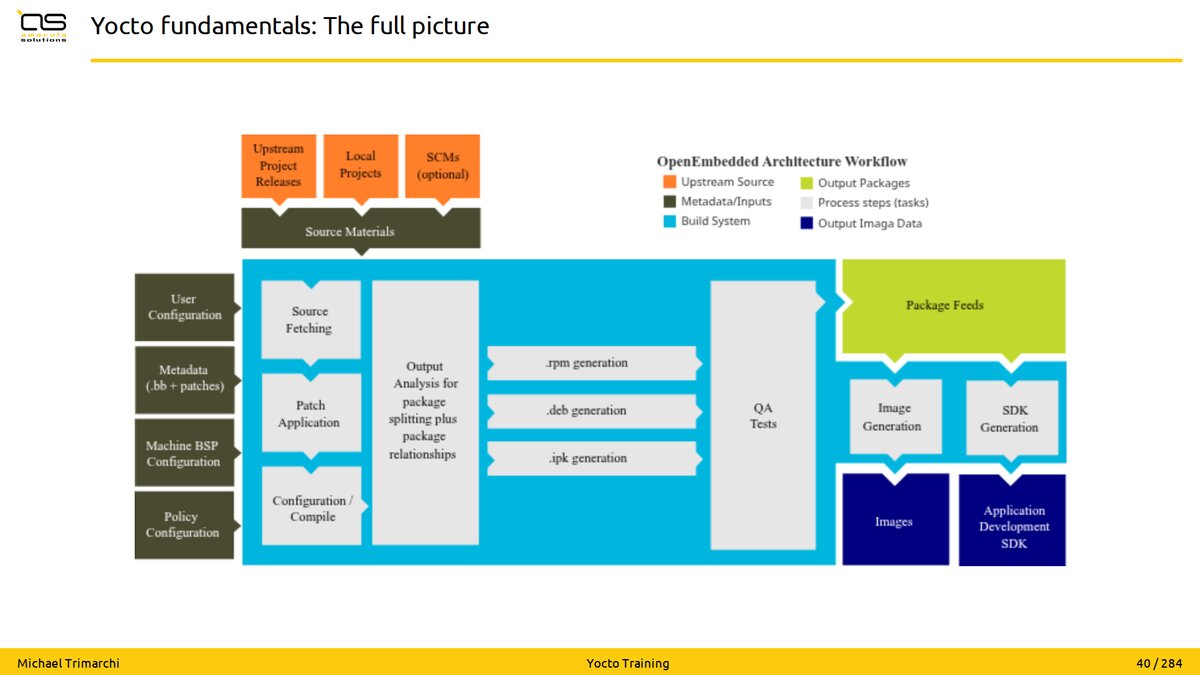
Selected slides from the course deck.
5 days
Minimum 3
Michael Trimarchi
On site only
€1,500 per participant
Download the course preview (PDF)
What you will learn
Build and boot a Yocto image with KAS.
Read and write recipes, classes and
.bbappendfiles.Create a layer and a BSP machine.
Customise images with packages, WIC and kernel fragments.
Use devtool and the SDK in a day-to-day development workflow.
Produce licence and SBOM reports and a reproducible release.
Who it is for
Engineers who build and maintain machines, kernels and bootloaders for embedded boards, and who need to keep that support across Yocto releases.
Developers who package software for a Yocto image, add system services and use the SDK to build and debug applications on the target.
Teams coming from Buildroot, vendor SDKs or ad-hoc build scripts that want a maintainable, reproducible build system and a clear metadata model.
Five-day programme
The suggested timing is five days: four core days plus one day for the capstone and advanced modules. Each block ends with a checkpoint and a lab.
Foundations
Bootloader, kernel and root filesystem
Android, Buildroot and Yocto: choosing a distribution
BitBake, metadata, OpenEmbedded-Core and layers
Build environment, directory structure and configuration
First image built with KAS and booted in QEMU
Metadata
Variables, operators, overrides and
bitbake -eParsing, task graph, dependencies and scheduling
Recipe structure,
SRC_URI, patches and packagingClasses,
.bbappendfiles, layers, machines and distros
Images and BSP
Image recipes, packagegroups and
IMAGE_FEATURESIMAGE_FSTYPES, WIC and.wksdisk layoutsKernel configuration fragments, device tree and modules
U-Boot configuration flow, FIT images, signing and secure boot
Development and releases
devtool and recipetool; standard and extensible SDK
systemd services, users, alternatives and package management
Debugging build and boot failures; sstate and build performance
Licence compliance, SBOM/SPDX and CVE checks
KAS projects, lockfiles and reproducible CI builds
Capstone and advanced modules
Capstone: a custom recipe, layer, systemd service, kernel fragment, WIC image, SDK and a locked KAS release
Advanced topics: multiconfig and multilib, sstate mirrors, secure boot and OTA updates
CI automation, SBOM/CVE reporting, checkpoints and Q&A
Hands-on labs
The hands-on project lives in the course repository. The labs use KAS to fetch
OpenEmbedded-Core, BitBake, meta-openembedded and the training layer, generate
the configuration and build training-image: core-image-minimal plus a
small C application, a target information script, SSH, a kernel configuration
fragment and a WIC image.
The exercises cover:
Inspecting the KAS-resolved configuration and the generated
local.confandbblayers.confBuilding the image and booting it in QEMU
Exploring the build directory, metadata and task graph
Modifying and finishing a recipe with devtool
Customising the image and its WIC disk layout
Adding a kernel configuration fragment
Building and using the SDK
Adding a systemd service
Debugging build and runtime failures
Inspecting shared state and build performance
Completing the capstone image
A separate KAS configuration targets the Engicam i.Core MX8M Plus board when the customer BSP layer is available.
Lab requirements
A Linux host, with Ubuntu 24.04 recommended
Python 3.9+,
pipx(or a Python virtual environment) and GitAt least 50 GB of free disk space and 8 GB of RAM
Network access for the first build
On Ubuntu 24.04 and later, unprivileged user namespaces for BitBake, or
kas-container
Course preview
The downloadable brief includes the course overview, the five-day programme, the hands-on labs and selected slides from the course deck.
Course materials
The slides and labs are public in the yocto-training repository. They are licensed under
Creative Commons Attribution-ShareAlike 3.0 Unported (CC BY-SA 3.0). Some
slides are based on or adapted from Bootlin’s “Yocto Project and OpenEmbedded
development training”, also licensed under CC BY-SA 3.0; see the NOTICE
and LICENSE files in the repository for the attribution, the list of
changes and the share-alike terms.
Prerequisites
Linux command line and Git
C programming
Embedded Linux basics: bootloader, kernel and root filesystem
Your trainer

Michael Trimarchi is co-founder and CEO of Amarula Solutions and a Linux software engineer working on embedded and real-time systems. Michael holds a Master’s degree in Software Engineering from the University of Pisa and is co-author of the first version of the EDF patches submitted to mainline Linux.
Michael teaches this training from the perspective of teams that ship Yocto-based products: the metadata and build decisions that keep a BSP maintainable across releases, and the release process that makes a build reproducible.
Booking and logistics
Yocto Project training: 5 days (4 core days plus 1 day for the capstone and advanced modules), €1,500 per participant; minimum 3 participants.
Delivery: on site only; the course is not available online.
Trainer: Michael Trimarchi.
Format: Instructor-led and hands-on, with KAS labs on QEMU and a board configuration for the Engicam i.Core MX8M Plus.
Materials: the public course repository, licensed under CC BY-SA 3.0.
Sessions are arranged on request. To reserve the training, request a quotation or contact us.