
Users logged out on every restart: Firebase Auth’s silent Keystore failure
TL;DR: On some Android devices, users of TravelSmart application, were sent back to the Login screen every time the app process was killed. Firebase Auth encrypts its stored session with a key in the Android Keystore. On the affected devices that key was gone while the data that depends on it remained, so every write of the session failed. Firebase logs the error and carries on, so the user stayed signed in only in memory. We now check for this state at app start and reset the broken encryption data, so Firebase creates a fresh key.
Symptom
Users on a few devices (seen on a Google Pixel 6a and a Motorola Edge 60 Pro) were taken back to the Login screen whenever the app was restarted. It happened with both Google and email sign-in. Signing in worked, and the app behaved normally until the process was killed.
How Firebase Auth stores the session
Firebase Authentication persists the signed-in user on disk so the session survives a restart. That data is encrypted, with these pieces:
A Tink keyset (Tink is Google’s cryptography library) stored in a shared preferences file named
com.google.firebase.auth.api.crypto.<persistenceKey>. It does the actual encryption of the session.An Android Keystore key named
firebear_main_key_id_for_storage_crypto.<persistenceKey>. It wraps (encrypts) the keyset, so the keyset on disk is useless without it.The session store, a separate shared preferences file that holds the encrypted user.
The Keystore key lives in secure hardware or a protected system service. It is never part of the app’s data directory and is never backed up. That is the weak point: the keyset file can exist while the key that unlocks it does not.
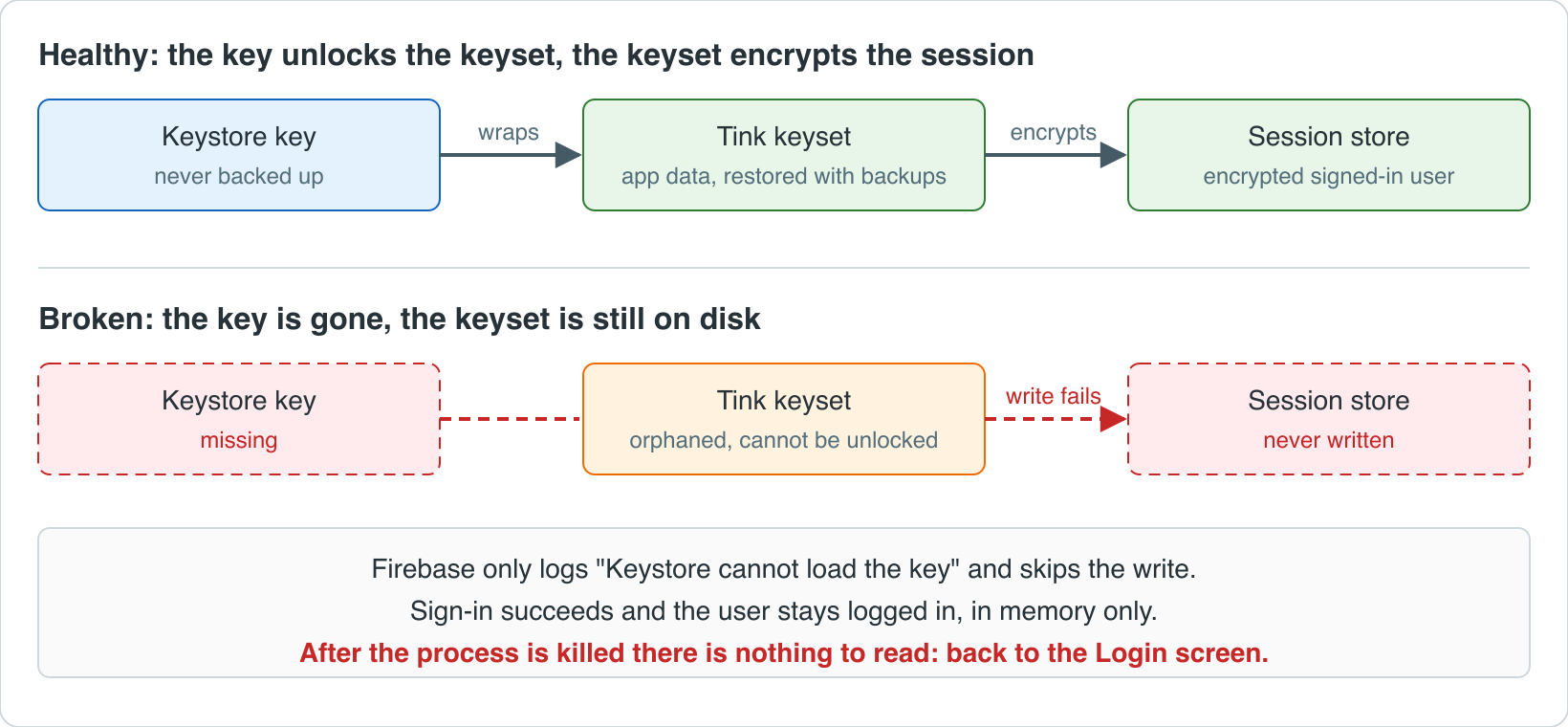
The healthy storage chain, and what happens when the Keystore key is lost but the keyset file is restored.
The silent part
On the affected devices the Keystore key was missing, but the keyset file was still there. Every attempt to encrypt the session then failed with:
FirebearStorageCryptoHelper: Keystore cannot load the key with ID:
firebear_main_key_id_for_storage_crypto.<persistenceKey>
The important detail is what Firebase does with that failure. It does not surface it. It logs the error and skips the write. As a result:
Sign-in succeeds, so nothing looks wrong to the user or to the app.
The user is held in memory, so the app works for as long as the process lives.
The session is never written to disk.
On the next process start there is nothing to read, so the user is logged out.
There is no exception to catch and no error callback. The only trace is one log line, and it appears on a device you are not looking at. The bug report was simply “I have to log in every time”.
How it was found
The logout pattern (always after process death, never during a session) pointed
at persistence rather than at authentication logic. Reading the device logs of an
affected phone showed the FirebearStorageCryptoHelper error, and checking the
shared preferences on the device showed the keyset file present with no matching
Keystore key.
A likely way to end up in this state is app data restored from a backup (see Auto Backup). The keyset file comes back with the data, while Keystore keys are never backed up. This was not confirmed on the affected devices.
The fix
FirebaseAuthStorageRepair runs first in Application.onCreate(), before
Firebase Auth uses its storage encryption. It does the following:
If the keyset file does not exist, do nothing. There is nothing to repair.
Ask the Keystore whether the key can be loaded. This is the same
KeyStore.getKey()check that Tink performs, so it detects exactly the condition that makes Firebase fail.If the key is usable, do nothing.
If the key is gone, delete the orphaned keyset. If a Keystore entry exists but cannot be loaded, delete that entry too. Tink reuses an existing entry, so a fresh keyset would otherwise be wrapped by the same unusable key.
Firebase generates a new key and keyset on the next sign-in.
The session store itself is not touched. Affected users have to sign in once more, and after that the session persists.
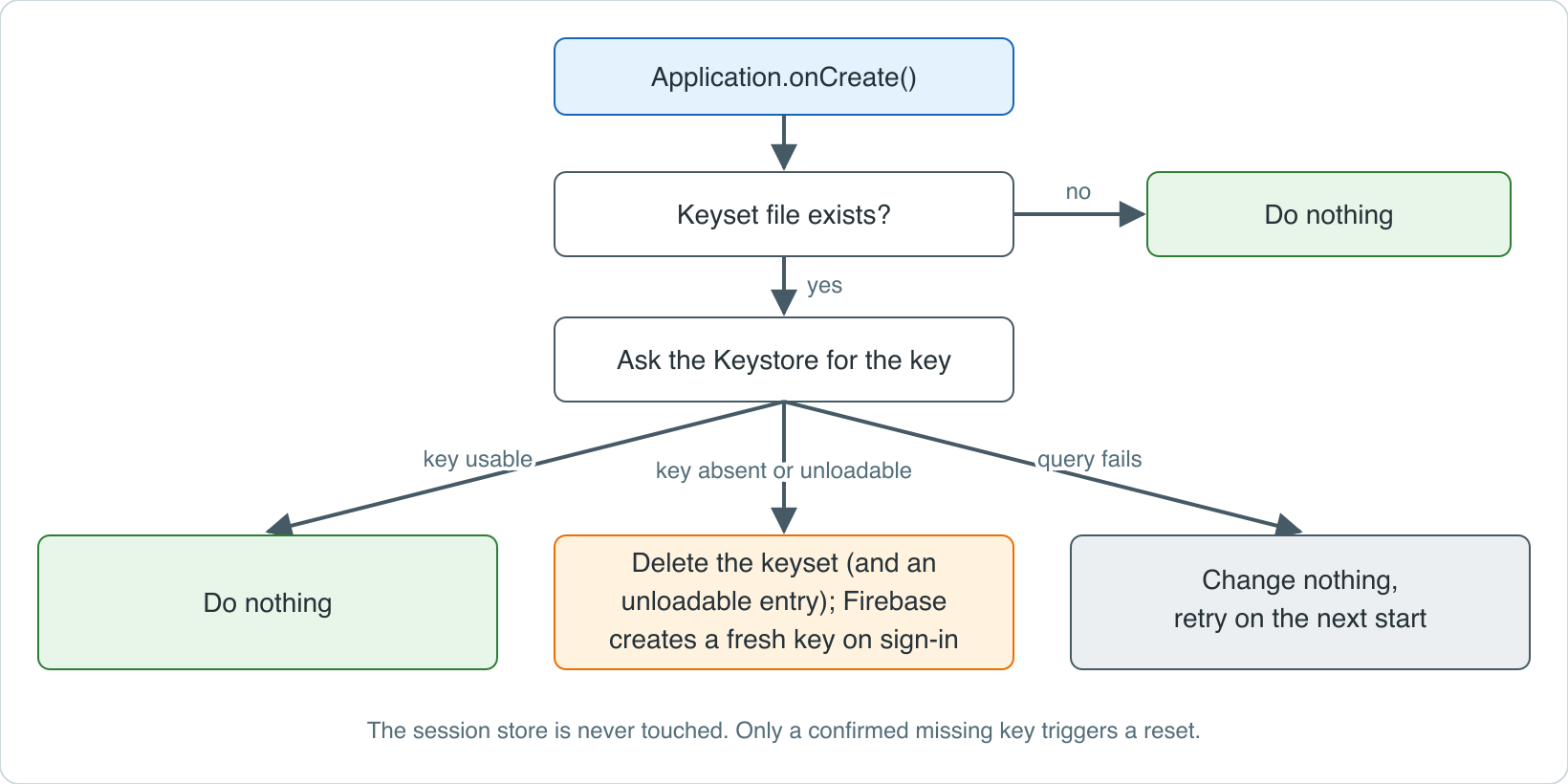
The decision flow of FirebaseAuthStorageRepair.
Being careful about what counts as broken
Deleting the keyset throws away a session that might still be recoverable, so the repair only acts on a confirmed result. If the Keystore cannot be queried at all (unavailable, locked, I/O error), the answer is inconclusive. The repair then changes nothing and tries again on the next start. The same applies if the unloadable entry cannot be deleted.
Two smaller details:
The keyset file is checked directly on disk rather than through
getSharedPreferences(). Loading the preferences would cache them in memory, and that stale copy would survive the file deletion.The whole check is wrapped so that a failure in the repair itself is only logged. It must never prevent the app from starting.
Testing it
The repair touches things that only exist on a real Android device: the Keystore, Firebase’s persistence key and the app’s data directory. Testing it on a physical device would mean reproducing a lost Keystore key, which is hard to do on demand. Instead the logic is split in two:
A thin public entry point looks up the real Keystore and Firebase’s persistence key and passes them in.
The core logic receives the Keystore access as plain functions (one that reports the key’s state, one that deletes an entry). It returns an outcome: not needed, repaired or deferred.
internal fun repairIfNeeded(
    context: Context,
    persistenceKey: String,
    keyState: (alias: String) -> KeyState,   // USABLE, ABSENT or UNLOADABLE
    deleteKey: (alias: String) -> Unit
): Outcome                                   // NOT_NEEDED, REPAIRED or DEFERRED
In a test the Keystore functions are replaced with fakes that return or throw whatever the scenario needs. No real Keystore is involved, and every branch can be exercised deterministically.
The tests still need an Android Context for the shared preferences and the
data directory. They use Robolectric, a framework
that runs Android code on a plain JVM against a simulated Android environment.
That makes them ordinary unit tests: fast, with no emulator or device, and
runnable on any CI agent. Each test writes real (simulated) preferences files and
then checks which of them are still on disk afterwards.
The cases covered are:
Key absent: the keyset is deleted and no Keystore entry needs removing.
Key unloadable: the keyset and the Keystore entry are both deleted.
Keystore cannot be queried: nothing is changed and the repair is deferred.
Unloadable entry cannot be deleted: nothing is changed and the repair is deferred.
Key usable: nothing is changed.
No keyset file: nothing is changed, and the Keystore is not even queried.
Session store: it is left untouched in every repair.
Two of the tests, slightly shortened. The first simulates the lost key and checks that the keyset is removed. The second simulates a Keystore that cannot be queried and checks that nothing is deleted:
@RunWith(RobolectricTestRunner::class)
class FirebaseAuthStorageRepairTest {

    @Test
    fun `resets keyset when its Keystore key is absent`() {
        writePrefs(KEYSET_PREFS)                    // the orphaned keyset

        val outcome = repair(keyState = { KeyState.ABSENT })

        assertThat(outcome).isEqualTo(Outcome.REPAIRED)
        assertThat(prefsFile(KEYSET_PREFS)).doesNotExist()
    }

    @Test
    fun `defers and keeps keyset when the Keystore cannot be queried`() {
        writePrefs(KEYSET_PREFS)

        val outcome = repair(
            keyState = { throw KeyStoreException("Keystore unavailable") }
        )

        assertThat(outcome).isEqualTo(Outcome.DEFERRED)
        assertThat(prefsFile(KEYSET_PREFS)).exists()    // nothing was destroyed
    }
}
The helpers used above are small. repair calls the core function with a
fixed persistence key and a deleteKey that records the aliases it was asked to
remove. writePrefs creates a preferences file through the Robolectric
Context, and prefsFile returns its path in the data directory:
private fun repair(keyState: (String) -> KeyState) =
    FirebaseAuthStorageRepair.repairIfNeeded(
        context = context,
        persistenceKey = PERSISTENCE_KEY,
        keyState = keyState,
        deleteKey = { deletedKeys += it }
    )

private fun writePrefs(name: String) {
    context.getSharedPreferences(name, Context.MODE_PRIVATE)
        .edit().putString("key", "value").commit()
}

private fun prefsFile(name: String) = File(context.dataDir, "shared_prefs/$name.xml")
The “defer” cases matter most. They protect against the repair destroying a session that could still have been recovered.
Takeaways
A library that logs an error and continues can hide a failure completely. If a bug only shows after a restart, check whether something is silently not being persisted.
Keystore keys and app data have different lifetimes. Data in the app directory can be restored from a backup, while Keystore keys cannot. Any encrypted data that depends on a Keystore key can end up orphaned.
Repair only on confirmed evidence. An error while checking the state is not the same as the state being broken, and destroying data on a guess can turn a recoverable situation into a lost session.
Run the repair early. It has to happen before the library first uses the broken storage, which means at the start of
Application.onCreate().
Further reading
Tip
Seeing issues with authentication, or a library that seems to fail silently on some Android devices? Amarula Solutions can provide Android development, debugging of device-specific issues, and architecture reviews for production apps. Contact our mobile team