
Moving a Data Log Over BLE
Note
TL;DR A practical TLV protocol walkthrough: how an embedded device can hand a recorded session to a mobile app over Bluetooth Low Energy, using a compact self-describing binary format, and how the app turns that byte stream into reliable local data. The same protocol runs in a Kotlin Android app and a Swift iOS app.
1. The problem
Many embedded products record data on the device and sync it to a phone later: a log of sessions, each holding timestamps, measurements and nested sub-records. The link is slow and lossy, packets are small, and the phone’s Bluetooth stack has its own quirks. Four requirements follow:
Compact: every byte costs radio time and battery.
Evolvable: firmware ships in the field for years, and new fields must not break old apps.
Verifiable: you must know whether a transfer arrived complete.
Testable without hardware: the protocol logic should run in plain unit tests.
This article walks through a design that meets all four, and the pitfalls we have seen in real projects.
2. Architecture: three layers, one direction
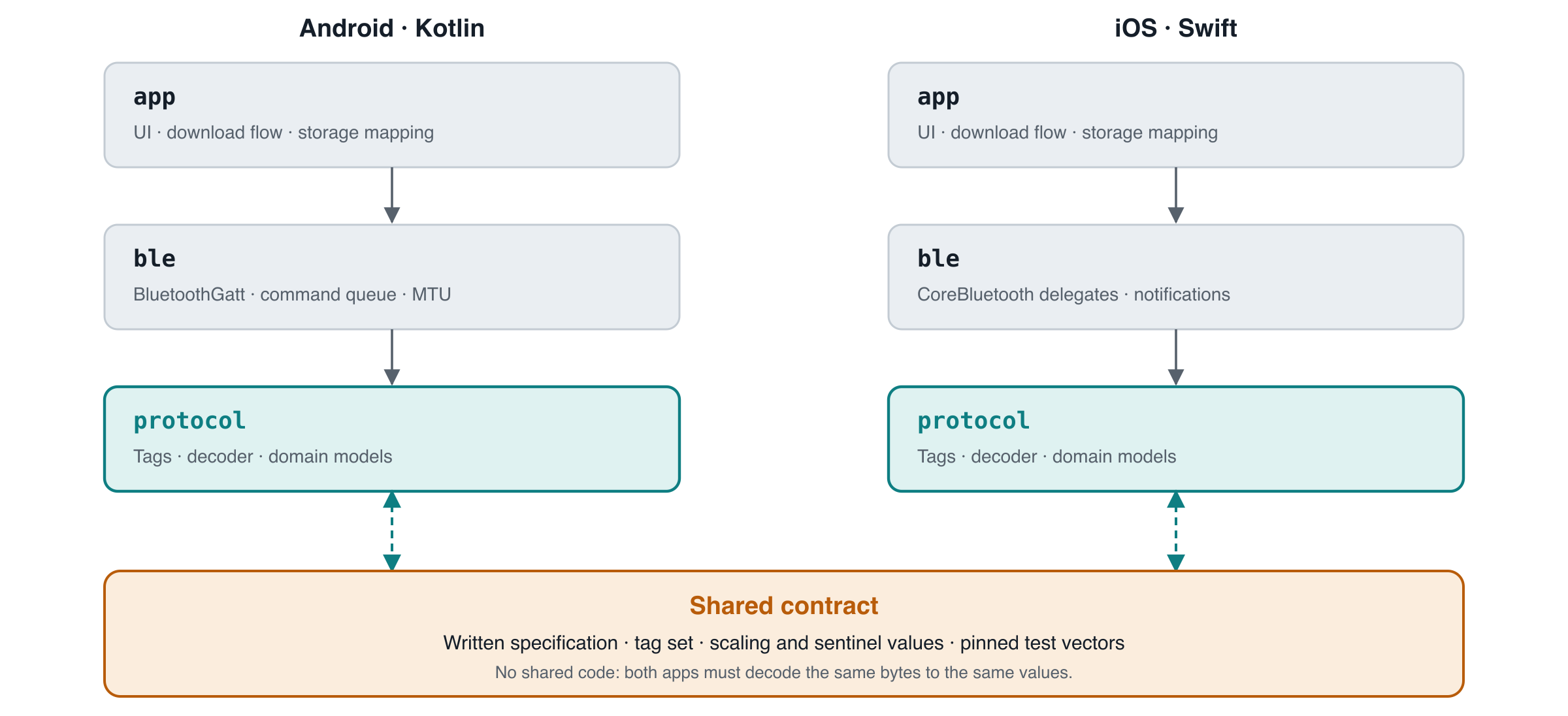
Both apps have the same three layers. What they share is the specification and the test vectors, not code.
Layer |
Owns |
Knows nothing about |
|---|---|---|
protocol |
Wire format, tag definitions, encode/decode, domain models |
Android, iOS, Bluetooth |
ble |
Connection, command queue, MTU, notification handling |
What the bytes mean |
app |
UI, download orchestration, mapping into the database |
Wire details |
The key decision is that the protocol layer has no platform dependency. Parsing logic can then be unit-tested on a laptop in milliseconds, reused on other platforms, and fuzzed. Anything that can be pure should be pure. The iOS app, written in Swift, follows the same split, which is what lets the two implementations be compared line by line (see section 7).
3. Choosing a wire format
Option |
Strengths |
Weaknesses |
|---|---|---|
Fixed-layout structs |
Smallest, trivial to write in C |
Any change breaks every deployed app |
JSON / CBOR |
Flexible, readable |
Heavy for MCUs and slow links, since field names repeat |
Protobuf |
Strong tooling |
Code generation on a small MCU, and it is not self-delimiting |
TLV (BER) |
Compact, self-describing, nests naturally, unknown tags can be skipped |
Needs discipline about tag allocation |
TLV (Tag-Length-Value) suits constrained devices well. BER-TLV is the same scheme used in smart cards and ASN.1, with mature parsers on every platform, so we did not write our own.
4. BER-TLV: the protocol itself
The previous section picked TLV; this one explains what is actually on the
wire. If you have only seen 70 1F 71 1D ... in a log, this is the part that
makes it readable.
Where TLV comes from
TLV is old and boring, which is its main selling point. It is the format behind smart-card and payment-terminal traffic (contact chips and contactless NFC), it appears throughout cryptography (X.509 certificates are DER, a strict subset of BER), and it turns up wherever two small devices need to exchange structured data over a narrow link: BLE, NFC, UART, TCP. When a customer needs low transmission size without giving up structure, it is a good default.
TLV is the general idea. BER (Basic Encoding Rules) is the concrete, standardised TLV encoding defined for ASN.1, and ASN.1 is the notation used to describe the data. The workflow that has worked for us:
Describe the data structure in ASN.1 notation and agree on it with the customer or the firmware team.
Allocate tags.
Encode and decode with an existing BER-TLV implementation.
Tag, Length, Value
Every element on the wire has three parts:
[ Tag: 1+ bytes ] [ Length: 1+ bytes ] [ Value: raw bytes or nested TLVs ]
Tag: identifies the element, and says whether its value is a raw primitive or a list of nested TLVs. Most tags fit in one byte.
Length: the size of the value in bytes, not counting the tag and length themselves.
Value: the payload. Either raw data (an integer, a string) or more TLVs.
Anatomy of a tag
The first tag byte packs three fields:
bit   8 7   6   5 4 3 2 1
     +-----+---+-----------+
     |class|C/P|  number   |
     +-----+---+-----------+
Class (bits 8-7):
00universal (types defined by ASN.1 itself),01application,10context-specific,11private. A protocol of your own normally lives in the application class, so its tags start at0x40.Constructed bit (bit 6,
0x20): clear for a primitive, set for a constructed element whose value is nested TLVs.Number (bits 5-1): 0-30 fits in the first byte. The value 31 (
11111) means the number continues in the following bytes, 7 bits each, with the top bit set on every byte except the last. That is how multi-byte tags work.
Reading the tags from section 5: 0x42 is 01 0 00010, an application
primitive numbered 2; 0x73 is 01 1 10011, an application constructed
element numbered 19. The universal class has fixed numbers worth knowing:
0x01 BOOLEAN, 0x02 INTEGER, 0x04 OCTET STRING, 0x0C UTF8String,
and 0x30 SEQUENCE (number 16 plus the constructed bit).
Describing the data with ASN.1
ASN.1 is a formal, platform-independent language for the structure and meaning of data. It is the contract between firmware and app, written before any code. A module is the container for type definitions:
ExampleModule DEFINITIONS IMPLICIT TAGS ::= BEGIN
    -- type definitions go here
END
Types are either simple (INTEGER, BOOLEAN, OCTET STRING,
UTF8String) or complex (SEQUENCE, an ordered list of named fields). Each
type gets a tag, written as class and number in brackets, for example
[APPLICATION 2]. The tag is what the encoder emits. The data from the worked
example in section 5 would be specified like this:
RecordingModule DEFINITIONS IMPLICIT TAGS ::= BEGIN
    RecordId    ::= [APPLICATION 1] INTEGER
    Duration    ::= [APPLICATION 2] INTEGER   -- hundredths of a second
    Index       ::= [APPLICATION 3] INTEGER
    Temperature ::= [APPLICATION 4] INTEGER   -- tenths of a degree

    Segment ::= [APPLICATION 19] SEQUENCE {
        duration Duration,
        index    Index
    }
    Record ::= [APPLICATION 17] SEQUENCE {
        id          RecordId,
        segments    SEQUENCE OF Segment,
        temperature Temperature
    }
    RecordSet ::= [APPLICATION 16] SEQUENCE OF Record
END
IMPLICIT TAGS means a tagged type replaces its base
tag instead of wrapping it, which saves two bytes per field and is what you
want on a constrained link. And a strict SEQUENCE OF adds a 30 wrapper
around the repeated items; the frame in section 5 skips it and simply repeats
the 73 tag, a common simplification in hand-specified protocols. Whatever
you choose, write it down in the contract.
What the length does and does not protect
Because every element declares its size, a receiver can check that the bytes it got add up. A truncated frame, a lost chunk or a mis-framed stream shows up immediately as a length that runs past the end of the data, or children that do not sum to their parent. That is cheap, structural error detection.
It is not an integrity check. A flipped bit inside a value changes the number silently and the lengths still add up. BLE’s link layer already carries a CRC; if the data matters beyond that (for example it is stored on the device and relayed later), add an application-level checksum.
Three rules for reading a hex dump
One bit says “I contain children”. Bit
0x20of the tag marks a constructed element, whose value is more TLVs. A clear bit marks a primitive leaf. You can tell the two apart from a hex dump alone.Length has two forms. If the top bit of the first length byte is clear, the low 7 bits are the length (0-127). If it is set, the low 7 bits give the number of following bytes that hold a big-endian length. Real payloads cross 128 bytes quickly, so both forms appear on the wire.
Primitives are fixed-width, big-endian integers. Physical values are sent as scaled integers (for example, tenths of a degree), so there is no floating point on the wire.
Because lengths nest consistently, a parser always knows where a sibling ends and the next begins. No delimiters or escaping are needed.
Evolvability for free
The decoder switches on the tags it knows and ignores the rest. Newer firmware can add tags and older apps keep working. Newer apps tolerate missing tags with sensible defaults.
5. A worked example
A complete frame holding one record, two timed segments and one temperature reading. The tags are illustrative.
70 1F 71 1D 41 01 01 73 09 42 04 00 00 1A 2C 43 01 01
73 09 42 04 00 00 19 FA 43 01 02 44 02 00 D7
Depth |
Bytes |
Field |
Meaning |
|---|---|---|---|
0 |
|
RECORD_SET (constructed, len 31) |
the whole frame, 33 bytes |
1 |
|
RECORD (constructed, len 29) |
one record |
2 |
|
RECORD_ID |
1 |
2 |
|
SEGMENT (constructed, len 9) |
first segment |
3 |
|
DURATION |
raw 6700, ÷100 → 67.00 s |
3 |
|
INDEX |
1 |
2 |
|
SEGMENT (constructed, len 9) |
second segment |
3 |
|
DURATION |
raw 6650, ÷100 → 66.50 s |
3 |
|
INDEX |
2 |
2 |
|
TEMPERATURE |
raw 215, ÷10 → 21.5 °C |
The lengths add up all the way up: the record’s 29 bytes are 3 (id) + 11 + 11
(segments) + 4 (temperature). Reading only the first two bytes, 70 1F, is
enough to know the full frame is 33 bytes. That matters in the next section.
6. Getting the bytes across BLE
A well-designed format does not help if the transfer is unreliable. Four points cover most of the trouble.
One command channel, one request in flight
Android’s BLE stack misbehaves when GATT operations overlap: callbacks are lost and writes silently fail. The fix is a serial command queue. Every GATT call goes into a queue, only one is outstanding at a time, and the next is released from the completion callback. No other part of the code touches GATT directly. This one rule removes a large class of “works on my phone” bugs.
Negotiate the MTU, then enable notifications
After service discovery, request the largest MTU the stack allows, then enable notifications. Only after that descriptor write succeeds should the connection be reported as ready. Triggering a download earlier loses the first packets.
Reassemble using the length header
A recorded session is larger than one notification, so the device streams it as many chunks. Instead of inventing a separate framing layer, reuse the length already in the TLV header:
From the first chunk, read only the outer tag and length (using the BER length rule above) and compute the total frame size.
Append each chunk to a buffer and report progress as
received / total, which drives the progress bar for free.When the buffer reaches the total, trim it to exactly that size (dropping any radio padding) and emit it once as a complete frame.
// Reads only the BER header, not a full parse
fun fullTlvSize(buf: ByteArray): Int {
    val first = buf[1].toInt() and 0xff
    return if (first and 0x80 != 0) {
        val n = first and 0x7f                    // number of length bytes
        2 + n + readBigEndian(buf, from = 2, count = n)
    } else {
        2 + first                                 // short form
    }
}
Downstream code only ever sees complete, correctly sized frames.
Multiplex by mode, not by extra characteristics
Several functions (data download, configuration, diagnostics) can share one write/notify characteristic pair. A short trigger selects the mode, and the notification handler is swapped to match. It is simple, but the decoder must always know which mode it is in. The two payloads are unrelated binary formats and must never be confused.
7. One protocol, two platforms
The same protocol is implemented natively twice: in Kotlin for Android and in Swift for iOS. The two apps share a contract, not code. That works because the format is self-describing and the layers are separate.
What turned out identical
The layering. Protocol, transport and app, with the protocol layer holding the tags, the scaling and the domain models.
Reassembly. The same four steps from section 6: check the outer tag, peek the length, accumulate and report progress, cut to size. The iOS version also rejects a first byte that is not the expected outer tag before trusting the length.
Scaling and sentinels. The same divisors per field and the same “no reading” values.
The mapper. The same shape: pair up interleaved lists, convert scaled integers, build the date.
Test layout. The same suites, the same fixture generator, and the same pinned hex frame as in section 5, copied from one test suite to the other.
What implementation taught us
The library decides what is “valid BER”, the device decides what is sent. The system decoder on iOS rejected some payloads that were valid on the wire, for example a frame followed by zero padding, or a truncated tail. The iOS decoder now prefers the system parser and falls back to a small scanner built on the same length rule from section 4. Each of these cases has a test with a trailing-zeros fixture.
Bugs port too. The two-digit-year shortcut from section 8 (
"20" + yy) exists in both mappers. A defect copied faithfully is a defect twice, so fix it on both sides and add the 2000-2009 case to the shared vectors.Same name, different behaviour. The frame-size helper exists on both platforms and passes the same test names, yet an empty buffer throws on one and returns
-1on the other. Decide such behaviour in the specification, not in each codebase.Copied fixtures drift. The pinned hex frame was copied between repositories. Moving it, with its expected decoded values, into one language-neutral file that both test suites load removes the drift.
Keeping two implementations honest
Treat the specification as the source of truth. One written description of tags, scaling, sentinels and error behaviour, not “whatever the Android code does”.
Share test vectors, not just test names.
Change the format additively. New tags only, so old firmware, old Android builds and old iOS builds keep working together.
8. From bytes to a database
The app layer converts decoded protocol objects into persisted entities in exactly one place, a mapper. Three things belong there, and each is a common source of bugs.
Interleaved lists. Pairs such as cold/hot readings often arrive as one flat list. Map them in pairs, and fail loudly if the list length is odd.
Sentinels for “no reading”. Devices usually send a saturated value (for example, the maximum of the type) rather than omitting the tag. Decide in one place who filters these. If the parser passes them through, every consumer must check, so document it.
Date handling. Two-digit years are a classic trap. Building a full year by string concatenation (
"20" + yy) breaks for 2000-2009 because5becomes"205". Add the year to a century constant instead. It is a small bug, but it only shows up years later and corrupts stored data.
Unit conversion stays simple because the format sends scaled integers: a fixed divisor per field, with no calibration tables on the phone.
9. Testing strategy
Because the protocol layer is pure, most of the risk can be covered without hardware:
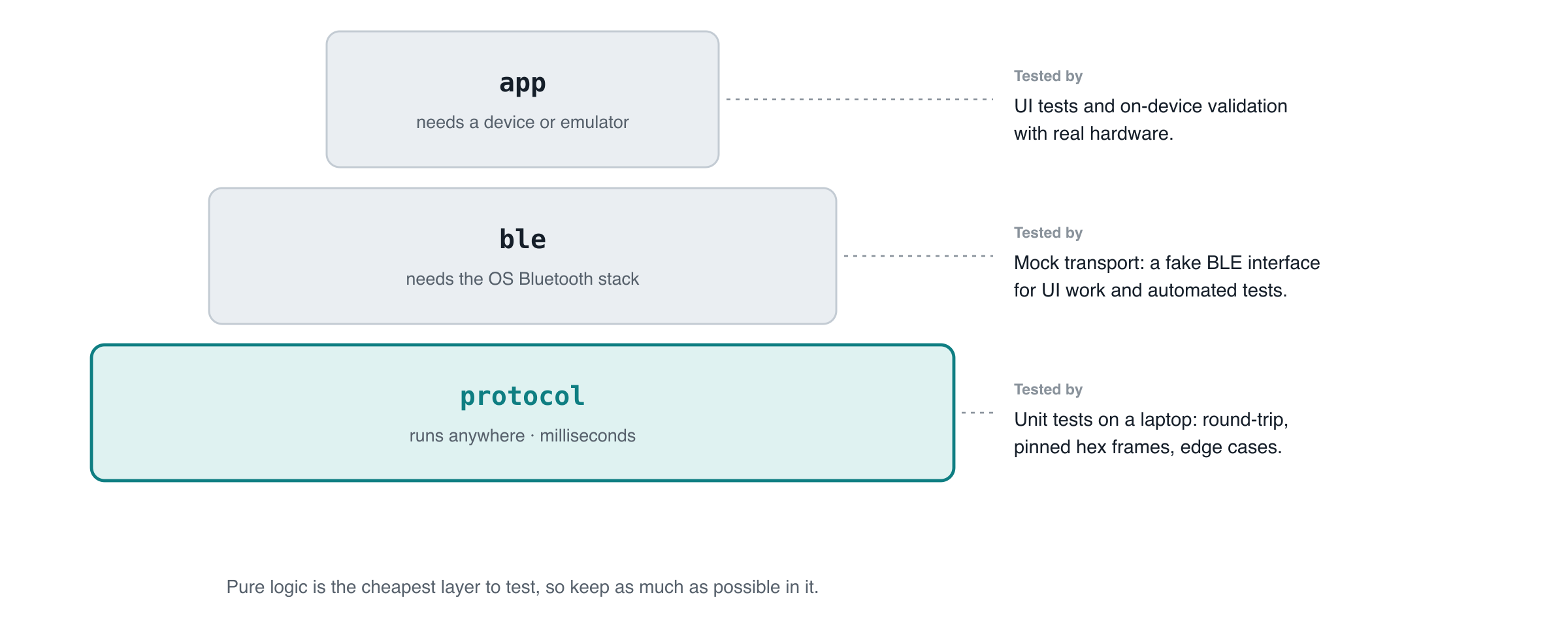
The lower the layer, the less it needs, and the faster it can be verified.
Round-trip tests. A fixture generator encodes randomised sessions, the decoder reads them back, and every field is asserted. The generator is also the encoder half of the protocol, even if production never uses it.
Pinned hex fixtures. A few fixed byte strings (like the one in section 5) guard against accidental format changes and double as documentation. Keep them in a language-neutral file so every platform’s test suite can load the same vectors (see section 7).
Edge cases. An empty collection, a missing optional tag, a length that crosses 127, and a truncated frame.
Frame-size agreement. The cheap lookahead from section 6 must always agree with the real encoded size, so test it against the full encoder.
A mock transport. A fake implementation of the BLE interface serves UI work and automated tests without a device. The app is built in a mock variant and a real hardware variant, so UI work never waits for a board.
10. Lessons that generalise
Keep the protocol pure. No platform dependency in the layer that defines the bytes.
Serialise all Bluetooth operations. Never let two GATT calls overlap.
Reuse the length you already have. A self-describing format gives you framing and progress reporting.
Design for change. Ignore unknown tags and tolerate missing ones.
Centralise mapping. One mapper, one place for unit, sentinel and date rules.
Make hardware optional for testing. Fixtures and a mock transport keep feedback fast.
Trust the real device. Protocol theory and real radios disagree often enough that on-device validation is part of the definition of done.
Treat the wire format as the contract. When the same protocol runs on several platforms, the specification and shared test vectors, not any one codebase, decide what is correct.
All tags and values in this article are illustrative.