
One Codebase, Two Platforms: Migrating an Android App to iOS with Kotlin Multiplatform
Note
TL;DR
How an existing Android View-based application (XML layouts, Fragments, Activities, RecyclerViews) was extended to iOS with Kotlin Multiplatform (KMP) for the business logic and Compose Multiplatform for the UI layer — without hiring a second Swift team or freezing the roadmap for a full rewrite.
The migration ran incrementally: business logic was untangled from Activities and Fragments first, the data layer and repositories moved into a shared Kotlin module before any new screen was built, and the legacy and Compose UIs coexisted in the same production binary behind a build-time feature flag.
Covers the platform abstraction pattern (one shared interface plus two native implementations, wired through
expect/actual) for maps, document scanning, OCR, PDF rendering, and Firebase — along with the real pitfalls: CocoaPods/resource-sync races, iOS keyboard insets, and platform-locked dependencies.
Every successful mobile product eventually reaches the same fork in the road: it started on one platform, it works well there, and the business now needs it on the other one too. Both obvious paths are expensive — hire and ramp up a second team to build and maintain a parallel native app, or freeze feature work for months while the whole product is rewritten from scratch. Neither is a good answer, and both put a live product with real users at risk.
What problem does supporting a second mobile platform create?
At some point, almost every growing product runs into this wall. The product started on one platform, it works well there, and the business needs it on the other one — while the existing app keeps shipping, keeps its users, and keeps its release cadence.
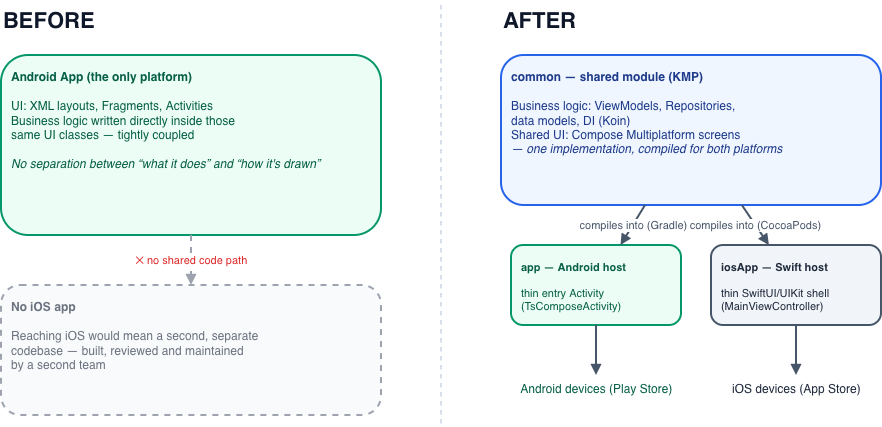
This is the situation Amarula Solutions faced with TravelSmart, an expense-tracking and time-tracking app that started life as a conventional Android application: XML layouts, Fragments, Activities, RecyclerViews, the classic View-based stack. The business needed an iOS client, and the team did not want to double headcount, fork the business logic, or stop shipping to Android users while the new platform was built.
Kotlin Multiplatform, paired with Compose Multiplatform for the UI layer, made it possible to do all three at once.
Why Kotlin Multiplatform instead of a second native team?
The appeal of KMP is not simply “share some code”. For a team in this position, it solved four concrete problems at once:
iOS delivery without a second team — the existing Android/Kotlin engineers could target iOS directly, instead of the business needing to staff, hire, or contract a separate Swift team from scratch.
One source of truth for business logic — ViewModels, repositories, data models, and platform utilities live in a single shared module. There is no risk of the Android and iOS apps quietly drifting apart because a bug fix or a business rule landed on one platform and not the other.
Real UI consistency — with Compose Multiplatform, the same declarative UI components render identically on both platforms. Only a handful of genuinely platform-specific pieces — maps, a document scanner — need separate implementations behind a shared interface.
Higher developer velocity — a declarative UI model combined with a single shared state-management pattern removes most of the friction of maintaining two parallel code paths, which is normally where cross-platform ambitions quietly die.
The migration also became a natural excuse to modernize a dependency graph that
had accumulated the usual signs of age: annotation processing moved from
kapt to KSP, the build scripts moved from Groovy to the Kotlin DSL,
manual dependency injection gave way to Koin, Joda-Time was replaced
with kotlinx-datetime, Gson with kotlinx.serialization, and the
platform-locked Firebase Android SDK was swapped for a
Kotlin-Multiplatform-compatible wrapper.
How do you migrate incrementally instead of rewriting?
The single most important decision in the whole project was choosing not to do a big-bang rewrite. Instead, the team ran the old View-based UI and the new Compose Multiplatform UI side by side, in the same production binary, switched by a build-time feature flag. Production always had a working, shippable fallback, and the new UI could be developed, tested, and validated screen by screen without ever putting the existing Android release at risk.
That decision shaped the rest of the sequencing, which was deliberately bottom-up:
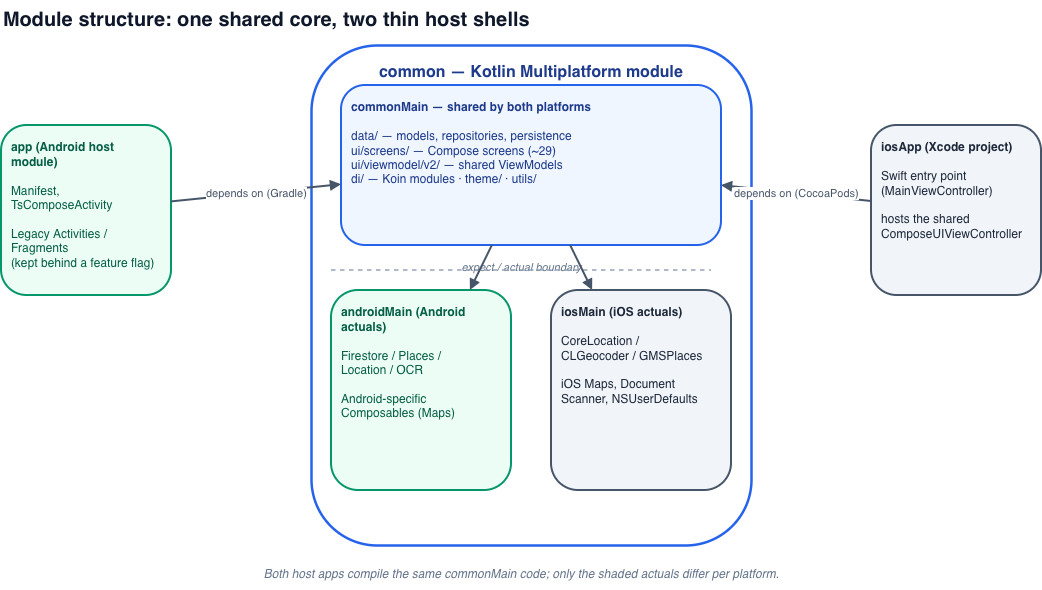
Untangle the logic first. Before any multiplatform code was written, business logic that had accumulated directly inside Activities and Fragments was refactored out into repositories and ViewModels. This is unglamorous work, but it is the real prerequisite for a clean migration — you cannot share code that is welded to a specific UI framework.
Scaffold the shared module. An empty Kotlin Multiplatform module was created and wired into the build.
Move the data layer. Firebase persistence, data models, and every repository were migrated into the shared module first, before a single new screen was built.
Bring iOS online as a build target. CocoaPods integration, Firebase pods, and iOS platform stubs were added so the project would actually compile and run on iOS.
Build the shared UI scaffold. A common theme, a shared navigation host, and the dependency-injection setup for view models went in.
Migrate screen by screen. Only once all of the above was solid did the team start re-implementing individual screens as shared Compose UI, starting with the simplest ones and working up.
The logic behind this order matters as much as the order itself: a UI that compiles but has nothing solid underneath it is a trap. By making sure every new screen could plug into a production-quality, already-shared data layer, the team avoided the classic failure mode of cross-platform projects — a beautiful new UI sitting on top of a shaky, half-migrated foundation.
What actually changes when you go multiplatform?
A few things are easy to underestimate about this kind of migration until you are in it.
State management gets standardized. The old code exposed LiveData-style
state directly to Fragments. The shared ViewModels adopt a strict UiState +
Effect pattern instead: one observable state stream per screen, plus a
separate stream for one-off side effects such as navigation or a snackbar. It is
a small pattern, but applying it consistently across every screen is what makes
the new codebase predictable to work in.
Dependency injection has to work identically on both platforms. Koin
replaced a hand-rolled dependency provider, with platform-specific pieces (such
as access to platform activities on Android) injected through Kotlin’s
expect/actual mechanism, which lets shared code declare an interface
once and provide a different implementation per platform.
Anything platform-native needs a shared abstraction. This is really the heart of a KMP migration: for every capability that touches the native platform directly — location services, geocoding, local preferences, permissions, file handling, PDF rendering, document scanning, OCR, maps, push notifications, even something as small as generating a UUID or writing a log line — the app defines one shared interface and two platform-specific implementations. Android keeps using its native APIs (Fused Location Provider, ML Kit, the Android Firebase SDK’s underlying transport) and iOS gets its own (Core Location, the Vision framework, native Firebase pods), but the rest of the app — and every screen built on top of it — only ever talks to the shared interface and does not know or care which platform it is running on.
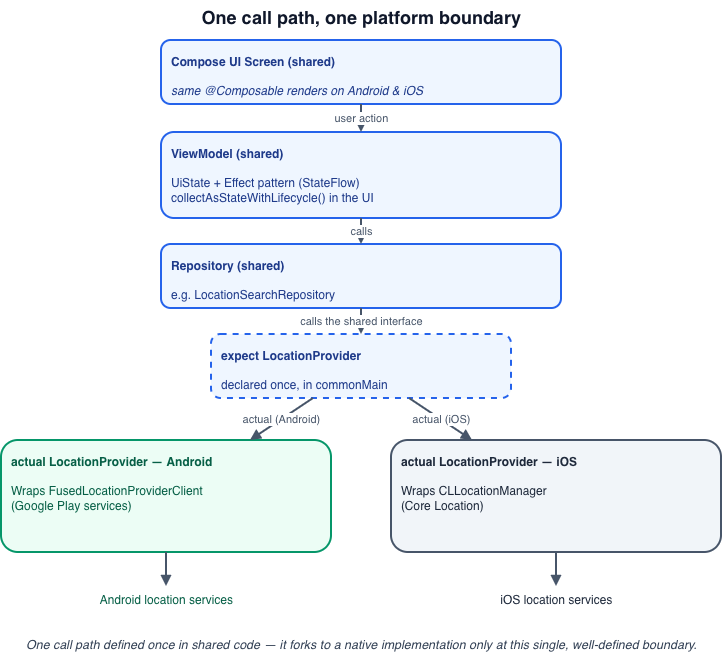
Some replacements are harder than they look. The Android Firebase SDK in particular is not multiplatform-compatible on its own, so it was replaced with a Kotlin-Multiplatform-native Firebase wrapper that exposes the same API on both platforms — a rewrite of every Firestore query and Auth call, but a one-time cost that pays off on every future feature. File and URI handling needed a genuinely cross-platform abstraction, since Android’s native URI type simply does not exist on iOS. Even something as ordinary-sounding as rendering a PDF ends up needing two real implementations — one built on Android’s native rendering tools, one on iOS’s — hidden behind a single shared interface the rest of the app calls into.
What are the genuinely hard parts of a KMP migration?
Not every problem in a migration like this is architectural — some are simply native-platform reality:
No cross-platform Google Maps component exists, so the team defined a shared map interface with a separate Android and iOS implementation behind it, rather than waiting for a library that does not exist yet.
Document scanning and OCR have no shared library either — Android’s on-device ML tooling and iOS’s native Vision framework were both wired in behind one shared interface.
iOS does not handle on-screen-keyboard insets the way Android does automatically — a small but real UX bug that needed an explicit fix once real users started testing on iOS.
Build tooling friction is real. iOS dependency resolution (CocoaPods) occasionally raced with the shared framework’s resource sync, causing intermittent missing-resource errors that needed a workaround during the build process.
None of these are exotic. They are the ordinary cost of supporting two real, different operating systems well, rather than settling for the lowest common denominator. The point of the shared-interface pattern is that this complexity gets paid once, in one well-defined place, instead of being smeared across every feature that happens to touch it.
Where does the migration stand today?
The migration reached the point where the shared Compose UI is the default experience on both Android and iOS, covering the full set of core screens, with the same data layer, the same business logic, and the same visual components running on both platforms.
The legacy Android-only code is still present but inert, kept only as a safety net until it is fully retired — at which point a meaningful amount of now-dead code and unused dependencies (an old reactive-programming library, an old image-loading library, an old calendar UI component) can be deleted outright.
What would we tell the next team planning a KMP migration?
A few lessons came out of this project that generalize well beyond it:
Sequence data before UI, always. The temptation is to start with something visible. Resist it. Migrating the data layer and business logic first means every new UI screen has something solid to stand on from day one.
A feature flag is worth the small extra complexity. Being able to ship the old and the new experience from the same binary, toggled at build time, turned a high-risk migration into a low-risk one. Production never lost its fallback.
Replace platform-locked dependencies early, not as you go. Libraries tied to one platform — a date/time library, a JSON library, a currency type — are cheap to swap out before you start sharing code, and expensive to discover mid-migration.
Pick one state-management pattern and apply it everywhere. Consistency across screens is what makes a large shared codebase actually navigable for a team, rather than a collection of one-off approaches.
Do not let two “generations” of anything linger. Where the old and new patterns had to coexist temporarily, that coexistence should be treated as debt to be paid down quickly, not as a permanent structure.
What is the bottom line for platform modernization?
What made this project work was not a clever trick — it was discipline about sequencing, a genuine commitment to an incremental path instead of a rewrite, and a willingness to do the unglamorous groundwork of untangling business logic from UI code before touching anything that looked like “the real migration”.
That is the same discipline required in any platform-modernization engagement: understand what is genuinely shared and what is genuinely platform-specific, build the boring foundation first, and never take production availability hostage to a migration. Kotlin Multiplatform and Compose Multiplatform are not the right answer for everything, but for a team that already knows Kotlin and needs to reach iOS without doubling headcount or freezing the roadmap, they are a genuinely strong one.
Tip
Facing the same fork in the road — a second mobile platform to support, an aging UI framework to leave behind, or a codebase fragmenting across platforms? Amarula Solutions delivers Android and iOS application development, Kotlin Multiplatform architecture, and long-term mobile maintenance. Contact our mobile team