
Jitsi Audio Bridge
Note
TL;DR - Jitsi Audio Bridge is an Amarula Solutions daemon that turns a Jitsi conference into a per-speaker transcript, an LLM summary and an email — it captures each participant’s Opus audio from the Jitsi Videobridge over a WebSocket, decodes it in-process with libopus, and runs it through a local Whisper and a local Ollama before mailing the result. - Licensed AGPL-3.0-only, Python 3.11+. Shipped with a Debian package, a hardened systemd unit, an S3 archiver for Jibri recordings, a batch mode for recordings that already exist on disk, and a deployment checker that can write the Jitsi-side configuration for you.
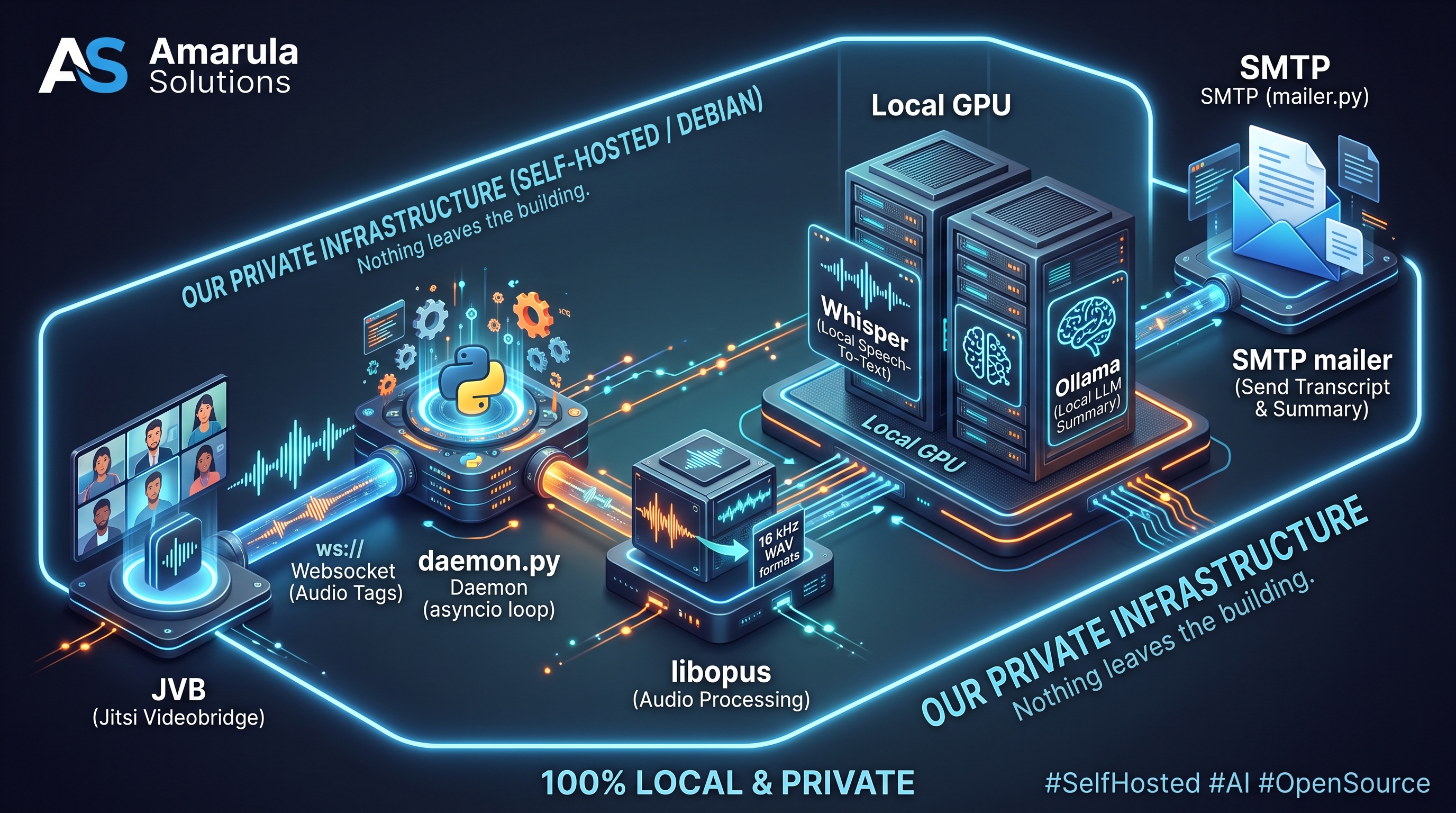
From a live Jitsi conference to a summary in the participants’ inbox
What is Jitsi Audio Bridge?
Jitsi Audio Bridge is an AGPL-3.0-licensed daemon that gives a self-hosted Jitsi deployment something stock Jitsi does not provide: a written record of every meeting, delivered by mail.
It runs as a WebSocket server. Jitsi’s videobridge — the JVB — opens one connection per conference and forwards every participant’s audio over it, tagged per participant. The bridge decodes each stream in-process through libopus into its own 16 kHz mono WAV file, and when the meeting ends it runs the recording through a Whisper instance for transcription and an Ollama model for summarisation, then emails the transcript and the summary to the people who were in the room.
Transcription and summarisation are local: Whisper and Ollama are HTTP endpoints you host, and the shipped defaults point at Amarula’s own infrastructure. The only outbound traffic is to those two services, to your SMTP relay, and optionally to an S3-compatible bucket of your choosing — so the audio and the text of a meeting never leave machines you control.
Note
ffmpeg is not required. Audio is decoded in-process through libopus, which the project notes is both faster and less fragile than piping packets to a subprocess. ffmpeg is only recommended, and only batch mode’s master-track extraction uses it.
How it works
The daemon is deliberately small and single-purpose, and each module knows about exactly one thing:
Stage |
What happens |
|---|---|
Capture |
A WebSocket server accepts one connection per meeting on a single route,
|
Decode |
Every audio frame carries one complete Opus packet. Each is decoded straight to 16 kHz mono PCM and appended to that participant’s own WAV. A packet libopus rejects is counted and skipped — it never aborts the recording. |
Timeline |
While the meeting runs, the daemon records who spoke when into
|
Transcribe |
Each participant’s audio is sent to the Whisper endpoint and comes back as text. |
Summarise |
The transcript goes to Ollama, which returns the meeting summary. |
Deliver |
The summary and the transcript are mailed over SMTP, in the language the meeting was held in. |
Modules. config resolves configuration and is the only module that
touches a file or the environment (a unit test enforces this). audio decodes
Opus and parses meeting metadata, with no network access. ai_client speaks
HTTP to Whisper and Ollama and does no path handling. mailer does SMTP.
s3_upload archives the recording. daemon serves the WebSockets and runs
the pipeline, and is the only module that knows about asyncio.
What are the key features?
Per-participant capture — one WAV per speaker, not one mixed track, so attribution in the transcript is by name rather than by guesswork.
Interleaved transcripts — with a timeline captured, the participants’ turns are merged into one time-ordered document,
[00:03:12] Alice: …, instead of a block per speaker.Sessions survive reconnects — a connection ending is not the meeting ending. The JVB closes one export and opens another for the same conference when a transcriber restarts or a bridge reconnects, so connections arriving within a grace window (60 s by default) resume the same session: the clock and the turns carry on, and the meeting is transcribed and mailed once, not once per connection.
The mail follows the meeting’s language — English, Italian, Spanish, French and German have their own subject line, headings and introduction, so an Italian meeting is not mailed under an English title.
Optional transcript correction — an extra LLM pass can repair grammar, punctuation and clearly misheard words before the summary is written. It is deliberately off by default, because it rewrites what people said: the raw transcript is always kept beside the corrected one.
Batch mode — the same pipeline runs over a meeting directory that already exists on disk, for recordings produced by something other than this bridge.
Video archiving — if Jibri recorded the meeting, the recording can be copied to any S3-compatible endpoint, optionally with a signed, expiring link in the mail.
Secrets stay out of the config file — every setting can be supplied through the environment as
JITSI_AUDIO_BRIDGE_<SECTION>_<KEY>, so an SMTP password can live in a systemdEnvironmentFileat mode 0600 and never be written to disk.A deployment checker —
jitsi-audio-bridge-verifyinspects a Jitsi host read-only by default, and with--fixwrites the remedy as a.newfile beside each file it would change, leaving the originals untouched.
Two ways in
The bridge serves two framings on the same route, dispatched by shape, without either side having to negotiate a mode.
The control-frame path. A sender that knows about the meeting sends JSON
control frames carrying meeting_url and a participants list, and binary
frames laid out as a fixed 16-byte participant id followed by exactly one Opus
packet:
┌────────────────────┬─────────────────────────────┐
│ 16 bytes           │ remainder                   │
│ participant id     │ exactly one Opus packet     │
│ ASCII, NUL-padded  │ (no container, no RTP hdr)  │
└────────────────────┴─────────────────────────────┘
This is the path that produces a fully attributed meeting: real room names, real speaker names, and recipients taken from the participants’ own addresses.
Stock Jitsi’s media-json. Jitsi can feed the daemon directly. With
bridge-based transcription, Jicofo tells the JVB to open one WebSocket per
conference and forward every participant’s Opus audio over it, tagged per
participant. That framing is JSON events — info, start, media,
ping, session-end — carrying base64 Opus payloads, and the JVB requires
its ping to be answered with a pong.
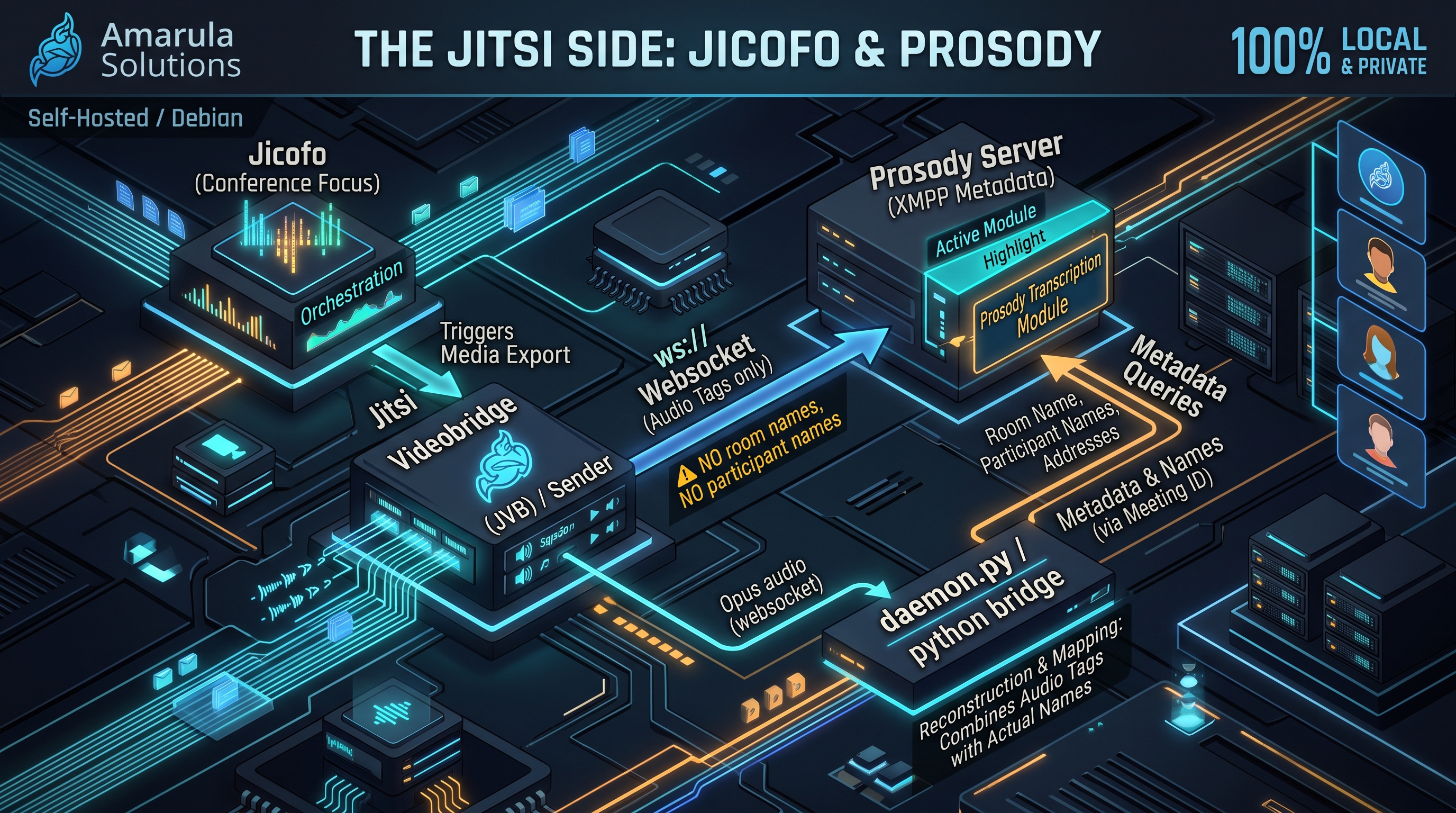
The Jitsi side: Jicofo’s transcription block, the Prosody module and the client flag
The trade-off is honest and worth stating plainly: that framing carries no participant names, addresses or room name. A meeting recorded this way is summarised as “General Meeting”, its speakers are attributed by their source tag, and the mail goes to a configured fallback recipient. The project documents how to give those sessions their names back — a small Prosody module writes per-meeting metadata that the daemon adopts — but it is extra work, and the page says so rather than pretending otherwise.
What you get
A meeting leaves behind a directory of its own:
<srv/recordings>/<sessionId>/
├── metadata.json            # the last control frame received
├── timeline.json            # who spoke when, captured live
├── participant-<id>.wav     # 16 kHz, mono, 16-bit PCM, one per participant
├── transcript.txt           # written once post-processing succeeds
├── transcript.corrected.txt # only with [ollama] correct_transcript
├── summary.md               # the LLM summary
└── video.json               # only with [s3]: where the recording went
Where a control frame arrived, the transcript is attributed by name:
[Alice]: Let's start with the release schedule.

[Bob]: I'll have the migration ready by Thursday.
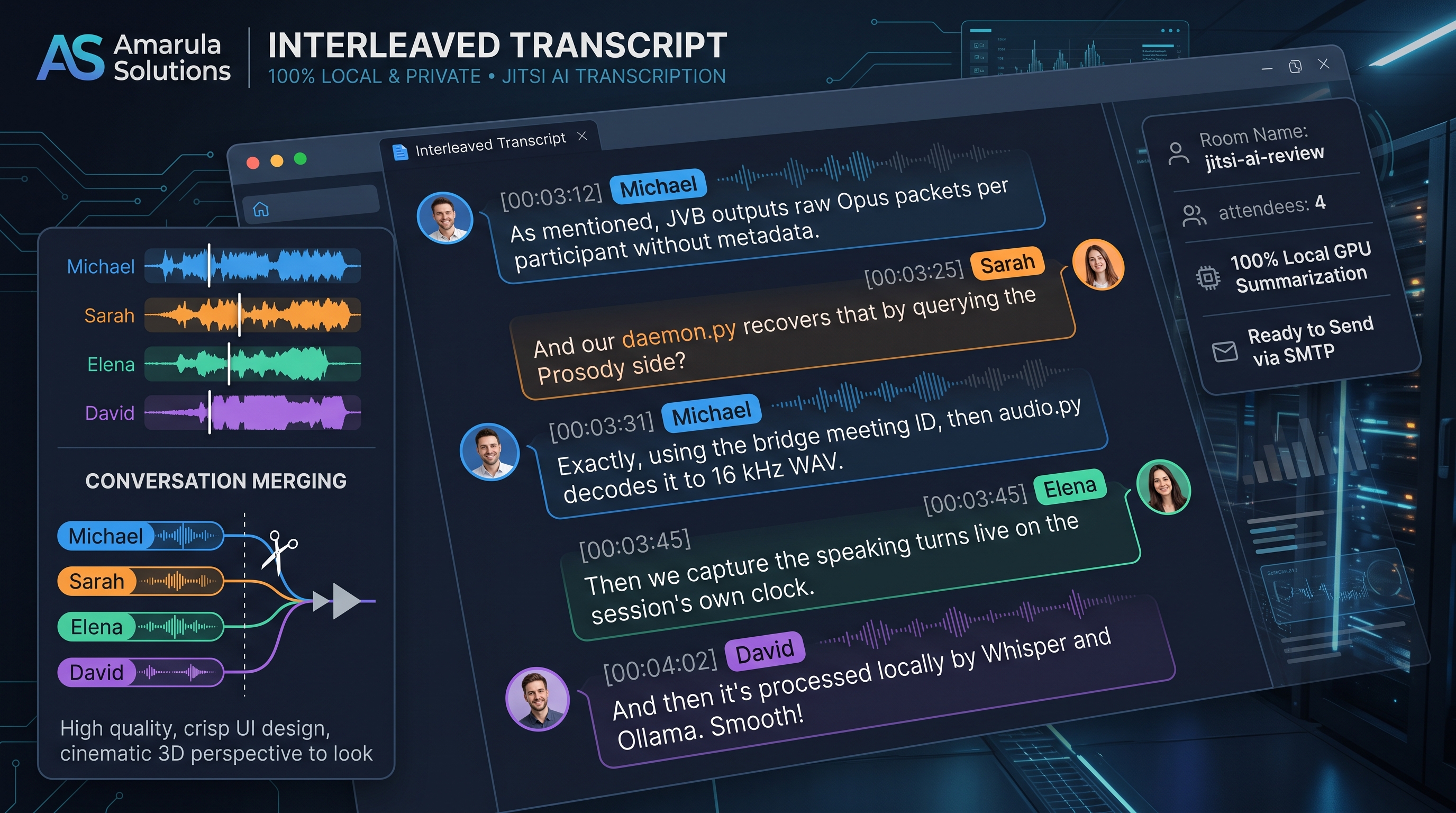
An interleaved transcript, one time-ordered document rather than one block per speaker
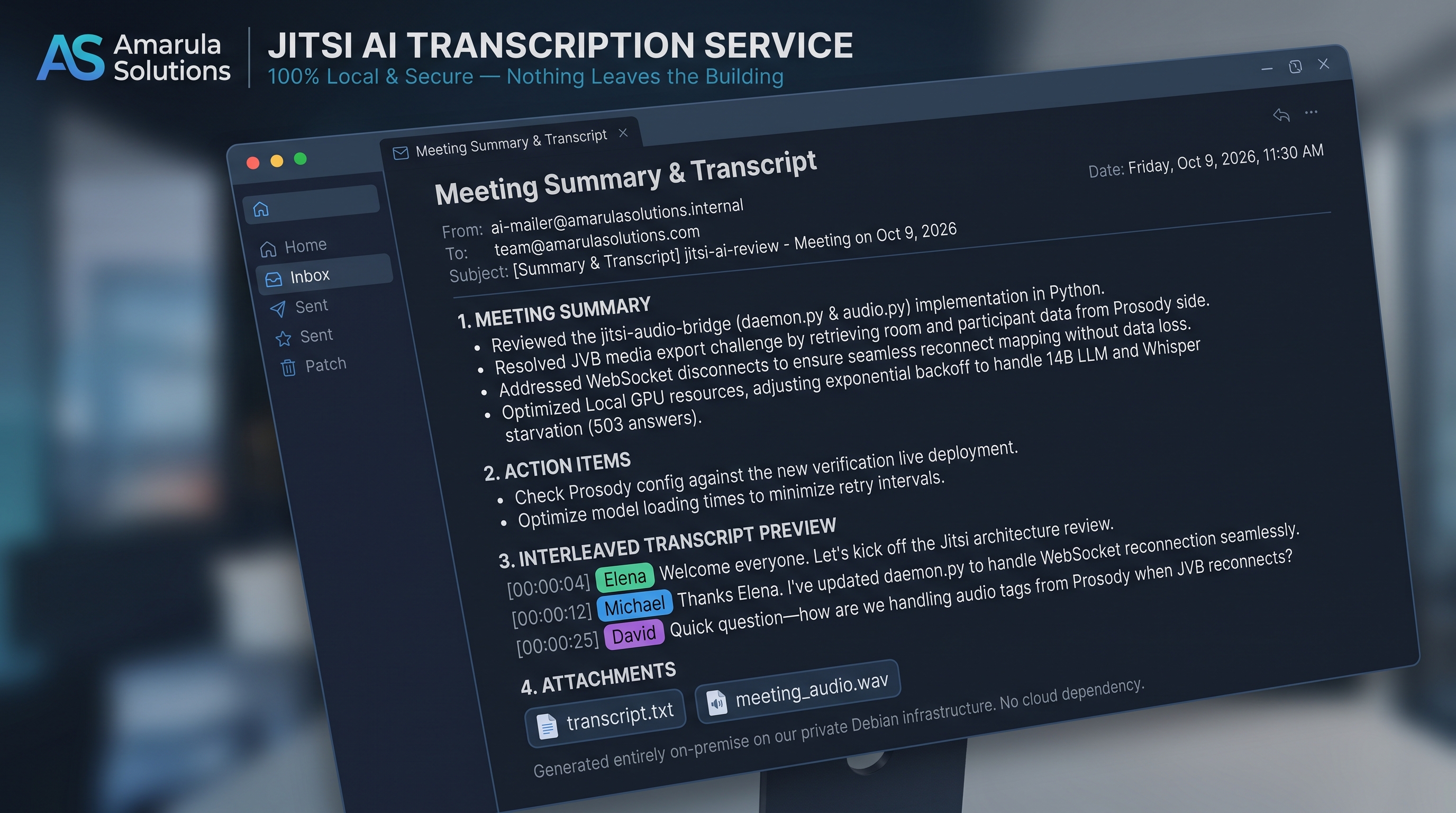
The summary mail as the participants receive it
Getting started
Requirements are deliberately light:
Python |
3.11 or newer (developed against 3.14) |
libopus |
|
Whisper |
Any HTTP endpoint accepting |
Ollama |
Any HTTP endpoint accepting the |
SMTP |
Any relay |
S3 |
Optional: any S3-compatible endpoint, plus Jibri’s recordings directory |
Install from source:
git clone https://github.com/amarula/jitsi-audio-bridge /opt/jitsi-audio-bridge
cd /opt/jitsi-audio-bridge

python3 -m venv .venv
.venv/bin/pip install '.[s3]'          # drop [s3] to leave boto3 out
cp config.ini.example config.ini
$EDITOR config.ini
Install into /opt, not /home: the shipped systemd unit sets
ProtectHome=yes, which makes /home inaccessible to the service.
A Debian package is also built from the tree with make deb. It carries its
dependencies in a private virtualenv, because the distribution’s
python3-websockets is older than the websockets>=13 the daemon requires
(Debian 12 ships 10.4, Ubuntu 24.04 ships 12.0). The package installs the
config as a conffile, so upgrades never clobber your edits, and it enables
the unit without starting it — you review the configuration and place the SMTP
password first.
sudo apt install dpkg-dev python3-venv
make deb
sudo dpkg -i dist/jitsi-audio-bridge_*_amd64.deb
Build on the machine you will install it on, or in a container matching it: a
virtualenv belongs to one interpreter version and architecture, and the
postinst warns loudly if the target’s python3 minor differs.
Configuration at a glance
Values are resolved from three sources, each overriding the one below it:
built-in defaults (so the daemon starts with no config file at all),
config.ini, then the process environment. A bad value is reported at
startup and names the exact setting and where it came from.
Section |
What it controls |
|---|---|
|
Listen address and port. Loopback by default — the JVB connects to it, nothing needs to be opened towards the daemon. |
|
Recordings directory, session grace period, timeline capture, optional cleanup after send (off by default: those files are the only copy of the meeting). |
|
Whether turns are interleaved into one time-ordered document, and how much silence between two runs of one speaker still counts as one turn. |
|
Concurrency and retry policy. |
|
Whisper endpoint, timeout, TLS verification. |
|
Ollama endpoint, model (default |
|
Relay, sender, fallback recipient, STARTTLS, subject suffix. |
|
Endpoint, bucket, prefix, Jibri’s recordings directory, link expiry. |
Archiving the video, and linking to it
If Jibri recorded the meeting, the recording can be copied to an S3-compatible bucket once the meeting has been transcribed. The upload never happens instead of the mail — a broken endpoint must not cost a meeting its summary — and by default not before it either, because a long upload should not delay a transcript.
With link_in_mail the order is deliberately reversed: the mail waits for
the recording so that the link in it works the moment somebody reads it. Four
properties of that link are documented rather than glossed over:
It is a bearer token. Anyone the mail reaches can download the recording until it expires, without logging in anywhere. The project recommends the shortest expiry window that still lets people fetch the file.
Recipients have to be able to reach it, which is not always the same address the daemon uploads to —
link_endpointis the name to set when the bucket is reached from outside by another one.Whatever proxy sits in front of the bucket has to pass the request through unchanged, query string and
Hostheader included, since the signature covers both.A failed upload is a log line, not a lost meeting.
delete_after_uploadonly removes the local file once the endpoint itself has confirmed the size, so an upload that half-finished never takes the only copy with it.
Recordings made before an endpoint was configured can be archived later without transcribing anything again:
jitsi-audio-bridge --upload-video /srv/recordings/<sessionId>
Current status and limitations
This is an alpha (0.1.0, “Development Status :: 3 - Alpha”) and the
project is unusually candid about where the edges are. The ones worth knowing
before deploying it:
The binary frame format is unverified. The
[16-byte id][Opus]framing is taken from the behaviour the code was written against; the sending side is not in the repository. Stock Jitsi’s own export is the media-json path, which the daemon serves separately.Ordering is per speaker, not per sentence. A speaking turn is the unit: two people talking over each other come out as two turns overlapping in time, and a long turn is split at 30-second resolution.
Transcription is sequential. Participants are processed one after another, so a long meeting is slow, and one Whisper timeout costs that participant’s text.
The video is matched by room and time, not by identity, because Jibri does not tell the daemon which meeting it recorded.
video.jsonrecords what was chosen, so a wrong match is visible after the fact.There is no retention policy. Recordings accumulate, here and in the bucket; nothing prunes either side automatically.
The full list, including known issues and deferred work, is in the project’s
REVIEW.md.
Development
The repository carries a real test suite rather than a smoke test and a promise: unit tests that need no network and encode their own audio fixtures, an end-to-end check that stands up stub Whisper and Ollama services and asserts on the WAV files, the prompts sent to Ollama, the delivered message and the negative cases (path traversal, a wrong request path, an audio-less session, a malformed control frame), plus a lint target.
python3 -m venv .venv && .venv/bin/pip install -e '.[dev]'

.venv/bin/pytest tests/              # unit tests, no network needed
python3 tests/smoke_test.py          # end-to-end, starts the stub services
python3 -m tools.testenv --auto      # the same environment, to poke at
.venv/bin/ruff check src tests tools # lint
There is also a sender simulator, so the bridge can be exercised without a Jitsi deployment anywhere in sight.
Licence
Copyright 2026 Amarula Solutions, under the GNU Affero General Public License,
version 3 — AGPL-3.0-only, not “or later”, and with no warranty of any
kind. In practice:
Using it, changing it and passing it on are all fine, as long as what comes out stays under the same licence and carries the notice.
Offering it to users over a network — a modified copy, on your own host — means those users have to be able to get the source, modifications included. A meeting recorded and transcribed on your own machines, with no outside users, triggers nothing.
Selling it, or offering it as a hosted service without publishing your changes, needs a different licence from Amarula Solutions.
The dependencies are all permissive, so nothing in the chain constrains the licence above. The recordings the daemon makes are a different matter entirely: they are the meeting participants’ personal data, and no licence grants anybody the right to record them — that is between the people in the meeting, their employer, and whichever law applies to them.
Tip
Running Jitsi in-house and want meeting notes without sending your audio to a third party? Amarula Solutions provides deployment, Jitsi-side integration, Whisper and Ollama sizing, custom feature development and commercial licensing for this project. Contact us