
Gerrit trigger for repo projects
Note
TL;DR
- How to handle Gerrit-triggered verification for multi-repository projects (e.g., AOSP) using the repo tool — covering cross-repository dependency recognition via Gerrit topics, deduplication of concurrent builds, and automated review labeling via the Gerrit REST API.
- Implemented in Amarula Solutions’ repo_jenkins_lib with classes Gerrit, GerritChange, Repo, and Manifest.
Some projects are composed of several git repositories that are dependent in some way. These repositories are usually managed using `repo` tool. Typical example of such project is Android open-source project (AOSP).
What are the challenges of verification builds for repo projects?
One change in one repository may need another change in a different repository in order to be complete and the whole project working without errors. These inter-repository dependencies complicate verification builds. Meaning that fetching just one change is not enough to successfully complete a verification build.
How do you prevent duplicate builds for the same topic?
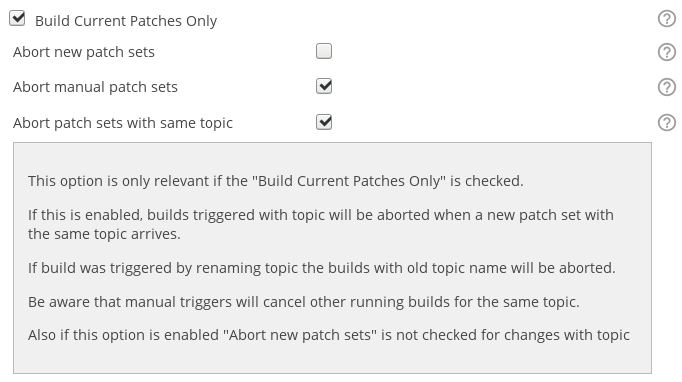
Each uploaded change triggers one build. We can’t do anything about that if we want to keep the trigger automatic. But Gerrit Trigger plugin configuration has a feature for stopping builds that have the same topic. It means that when a new verification build for related changes is started, the already running build (if there is one) is stopped.
This can be configured in ‘Manage Jenkins’ → ‘Gerrit Trigger’ → ‘Abort patch sets with same topic’:
It is also recommended to change value of ‘Build Schedule Delay’ to at least 10 seconds. This option is located also in ‘Gerrit Trigger’ configuration under ‘Advanced …’ → ‘Miscellaneous’.
How do you set the Verified flag on all changes?
The build is triggered for only one specific change, so only that one receives automatically the review. We have to set review for all the changes that we used. We can keep a list of changes from the ‘Fetch changes’ section and set review for each one using Gerrit REST API `POST /changes/{change-id}/revisions/{revision-id}/review`.
https://gerrit-review.googlesource.com/Documentation/rest-api-changes.html#set-review
curl -X POST --user "jenkins-builder:${GERRIT_JENKINSBUILDER_PASSWORD}" --header "Content-Type: application/json; charset=UTF-8" -d "{ \"labels\": { \"Verified\": 1 } }" "https://${GERRIT_URL}/a/changes/${GERRIT_CHANGE_ID}/revisions/${GERRIT_REVISION_COMMIT_ID}/review"
The response contains changes in review made to the change with change ID GERRIT_CHANGE_ID (“Change-Id:” in commit message) and patchset identified by its commit ID GERRIT_REVISION_COMMIT_ID.
How is this implemented in the Repo Jenkins Library?
https://gitea.amarulasolutions.com/i-tools/repo_jenkins_lib
Main classes
Example usage of library
@Library('repo_jenkins_lib')
import com.amarula.gerrit.GerritChange
import com.amarula.repo.Repo

node {
  stage('Repo init and sync') {
    def changes = []
    def value = GerritChange.FAILURE
    withCredentials([usernamePassword(
        credentialsId: 'jenkins-builder-amarula_gerrit-rest-api',
        passwordVariable: 'GERRIT_RESTAPI_PASS',
        usernameVariable: 'GERRIT_RESTAPI_USER')]) {
      try {
        def project = new Repo(this, env,
            'ssh://gitea@gitea.amarulasolutions.com:38745/myAndroidProject/manifest.git')
        sshagent(['someCredentialId1', 'someCredentialId2']) {
          // repo init
          project.init()

          // checkout topic changes for manifest
          changes.addAll(project.checkoutTopicForManifest(env.GERRIT_TOPIC))

          // repo sync
          project.sync()

          // checkout topic changes for projects
          changes.addAll(project.checkoutTopic(env.GERRIT_TOPIC))

          // build project
          sh 'make'

          value = GerritChange.SUCCESS
        }
      } finally {
        for (change in changes) {
          change.setVerified(value)
        }
      }
    }
  } /* END 'Repo init and sync' */
}
Tip
Working with multi-repository projects and need Gerrit verification? Amarula Solutions provides repo_jenkins_lib customization, multi-repo CI/CD setup, and Gerrit integration for Android and embedded projects. Contact our CI/CD team