
Build Dependency Cache for Docker Jobs
Note
TL;DR
- How to configure Jenkins Docker jobs to use a Sonatype Nexus proxy cache for build dependencies — avoiding repeated downloads of the same artifacts across clean builds. Covers Gradle, Grails, npm, and Yarn with a custom Jenkins shared library method (Verification#build()).
- Implements a cache-aside pattern where each Jenkins node runs a dedicated Nexus instance that serves as a local artifact proxy.
Docker jobs on Jenkins always starts clean, so time and bandwidth are usually wasted in downloading the same build dependencies again and again. This page shows how you can configure the jobs to use a proxy cache for the build dependencies in various build systems.
A proxy cache is like a proxy server for downloading build dependencies, but it caches the files and reuse them the next time the same files are downlaoded. Many artifact hosting projects support such features.
Another approach would be to cache the job outputs and restore them on the next job, similar to GitHub Actions. Unfortunately, Jenkins has no such feature.
How do you configure a pipeline to use the proxy cache?
Beware that we only need to care about Docker jobs. Jenkins jobs not running in Docker are run in the same system and thus share the build system like Gradle Daemon.
This shows a simple pipeline that will use the proxy cache:
import com.amarula.build.Verification
node('android-build') {
    final def ver = new Verification(this, env, 'XXX')
    final def repoUrl = "${GERRIT_SSH_JENKINSBUILDER_URL}/ipco_navy/wcs_ipcosip_benchmark"
    final def buildCode = {
        sh "gradle check"
    }
    ver.build(repoUrl, buildCode, 'docker.io/gradle:jdk11')
}
The most important thing here is that the name of the Docker image is specified in method Verification#build() .
By utilizing this particular Jenkins library method, the job will be run in a Docker container configured to use the proxy cache provided by a Sonatype Nexus instance dedicated to the Jenkins node. Supported build systems include:
Gradle (See also: the initialization script)
Grails
npm
Yarn (Won’t work because
package-lock.jsonreferences npm registry. See https://github.com/yarnpkg/rfcs/pull/64)
See this directory for all the public repositories configured in the Sonatype Nexus instance.
How do you work around Yarn’s registry limitations?
Yarn does not honor the overridden registry if a package-lock.json exists. A workaround is to replace the registry URL in that file with the proxy cache URL. For example, add this before running Yarn:
sh "touch ~/.yarnrc.yml"
final def registry = sh(
    script: "yq .npmRegistryServer ~/.yarnrc.yml",
    returnStdout: true,
).trim()
if (registry != "null") {
    echo "Replacing the hardcoded registry in `package-lock.json` with $registry"
    sh "sed --in-place --expression='s|\"resolved\": \"https://registry.npmjs.org|\"resolved\": \"${registry}|g' package-lock.json"
}
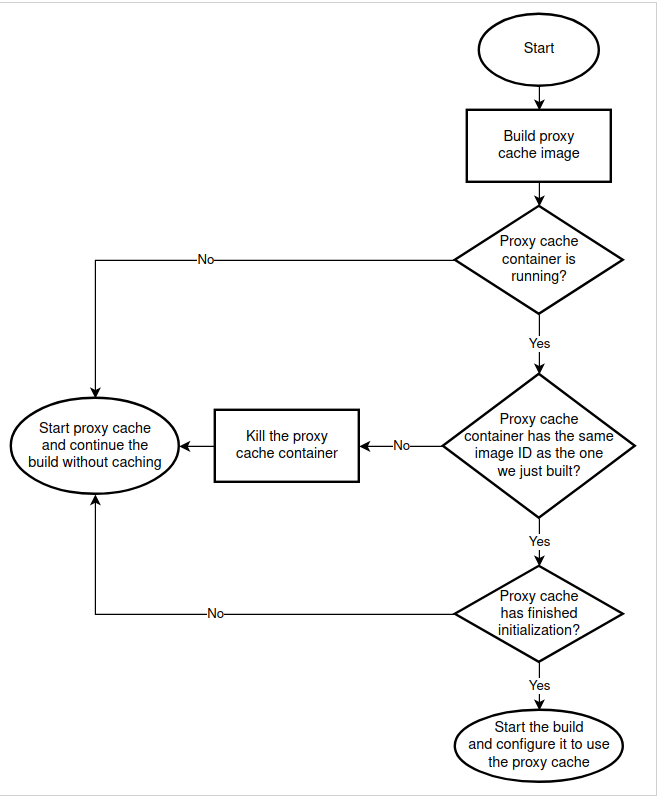
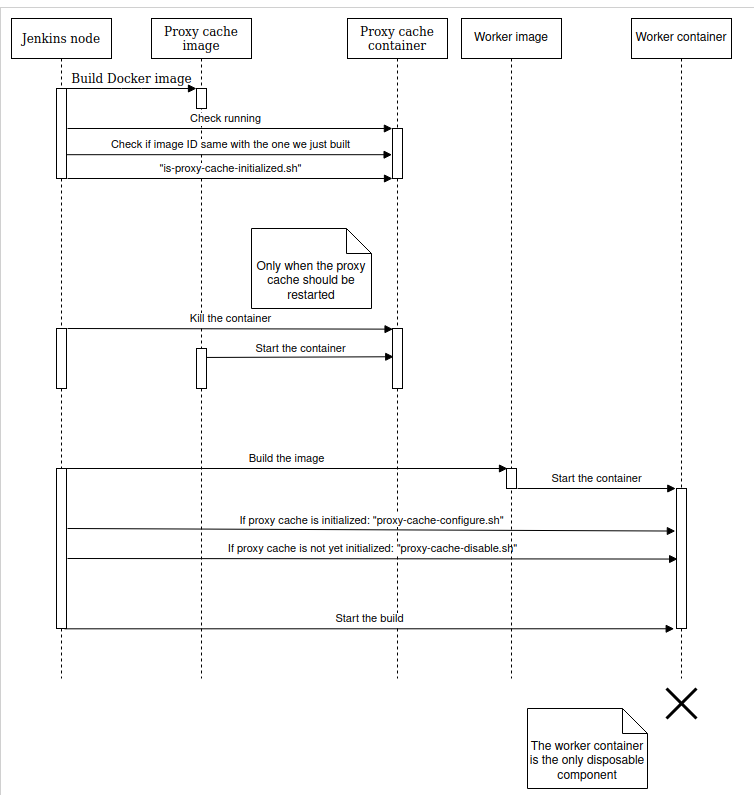
How is the proxy cache implemented in the Jenkins library?
This patch implements the process of running the proxy cache service. Here are some diagrams demonstrating the process:
Tip
Need faster CI builds with dependency caching? Amarula Solutions configures Jenkins pipelines with Docker proxy caches, S3 remote caches, and shared SSTATE for Yocto — optimizing embedded build performance. Contact our CI/CD team