
A20-OLinuXino-LIME2
Note
TL;DR - Mainline BSP bring-up guide for this board — covering U-Boot, Linux kernel, and Buildroot build from source with SD/flash boot, serial console access, and device tree configuration. - Part of Amarula Solutions’ upstream-first BSP documentation for Allwinner SoCs.
This tutorial will show the details of Olimex A20-OLinuXino-LIME2 board mainline support and other details like hardware, documentation, schematics are available at hardware and linux-sunxi
How do you access the hardware?
Power supply: External 5V Jack USB OTG Cable, USB to TTL for debug
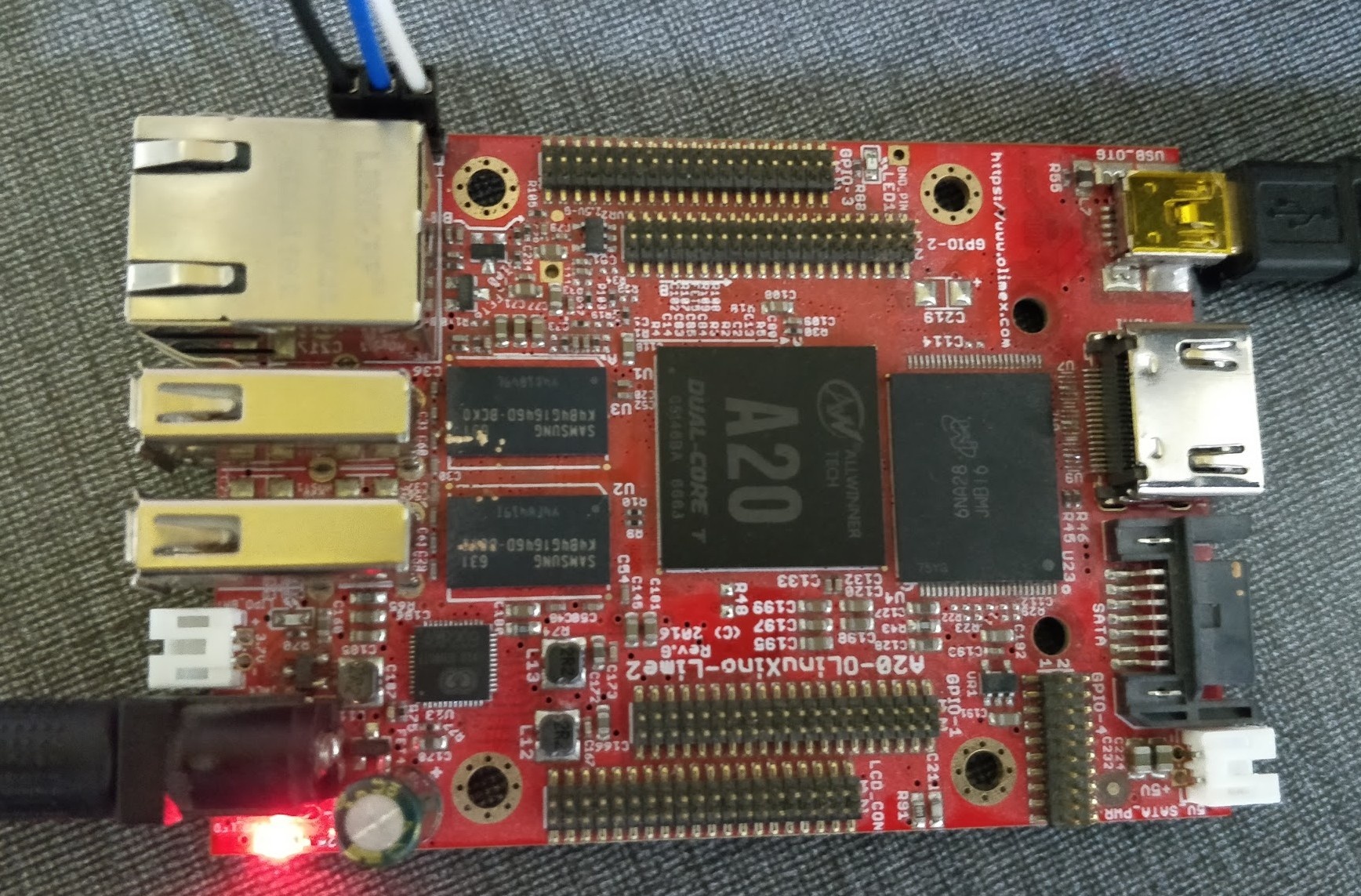
How do you build the BSP?
Image building need host to ready with all necessary tools ready, refer here
How do you build U-Boot?
git clone git://git.denx.de/u-boot.git
cd u-boot
make A20-OLinuXino-Lime2_defconfig && make
How do you build the Linux kernel?
git clone git://git.kernel.org/pub/scm/linux/kernel/git/next/linux-next.git
cd linux-next
make mrproper
ARCH=arm sunxi_defconfig
ARCH=arm make -j 4 zImage dtbs
How do you boot the system?
How do you boot from SD card?
How do you boot via FEL/USB?
How do you build U-Boot?
USB Mass Storage gadget
We can use the board as a USB Mass Storage device: You will be able to access all the partitions of any block device that is on the board or connected to it, from your host PC - You will see them as /dev/sdXX, just like connecting a regular USB storage to your PC, and you’ll be able to mount them, and have full read/write access to them. We can even use it to flash a new U-Boot, re-partition the storage, re-format it, etc. This is especially useful for updating the internal eMMC. To do this you need to connect a USB cable between the OTG/Client port of the board and a regular USB Host port on your PC, and use U-Boot’s ums command.
U-Boot SPL 2017.11-00464-g2fac022-dirty (Dec 06 2017 - 11:21:03)
DRAM: 1024 MiB
CPU: 912000000Hz, AXI/AHB/APB: 3/2/2
Trying to boot from MMC1
U-Boot 2017.11-00464-g2fac022-dirty (Dec 06 2017 - 11:21:03 +0530) Allwinner Technology
CPU: Allwinner A20 (SUN7I)
Model: Olimex A20-OLinuXino-LIME2
I2C: ready
DRAM: 1 GiB
MMC: SUNXI SD/MMC: 0
*** Warning - bad CRC, using default environment
To exit the ums command and disconnect the USB device press ctrl+c.
In: serial
Out: serial
Err: serial
musb_usb_probe
sunxi_musb_init():
1 sunxi_musb_init():
2 sunxi_musb_init():
2.per sunxi_musb_init():
3 sunxi_musb_init():
sunxi_musb_disable():
musb-hdrc:ConfigData=0xde (UTMI-8, dyn FIFOs, bulk combine, bulk split, HB-ISO Rx, HB-ISO Tx,
SoftConn)
musb-hdrc: MHDRC RTL version 0.0
musb-hdrc: setup fifo_mode 2
musb-hdrc: 7/11 max ep, 2624/8192 memory
USB Peripheral mode controller at 01c13000 using PIO, IRQ 0
Allwinner mUSB OTG (Peripheral)
SCSI: SATA link 0 timeout.
AHCI 0001.0100 32 slots 1 ports 3 Gbps 0x1 impl SATA mode
flags: ncq stag pm led clo only pmp pio slum part ccc apst
Net: eth0: ethernet@01c50000
Warning: usb_ether using MAC address from ROM
, eth1: usb_ether
starting USB...
USB0: USB EHCI 1.00
USB1: USB OHCI 1.0
USB2: USB EHCI 1.00
USB3: USB OHCI 1.0
scanning bus 0 for devices... 1 USB Device(s) found
scanning bus 2 for devices... 1 USB Device(s) found
scanning usb for storage devices... 0 Storage Device(s) found
Hit any key to stop autoboot: 2 0
=> ums 0 mmc 0
UMS: LUN 0, dev 0, hwpart 0, sector 0x0, count 0xe94000
sunxi_musb_enable():
|/musb-hdrc: peripheral reset irq lost!
-\|/-\/-\|/-\/-\|/-\/-\|/-\/-\|/-\/-\|/
#include <linux/uinput.h>

void emit(int fd, int type, int code, int val)
{
   struct input_event ie;

   ie.type = type;
   ie.code = code;
   ie.value = val;
   /* timestamp values below are ignored */
   ie.time.tv_sec = 0;
   ie.time.tv_usec = 0;

   write(fd, &ie, sizeof(ie));
}

int main(void)
{
   struct uinput_setup usetup;

   int fd = open("/dev/uinput", O_WRONLY | O_NONBLOCK);


   /*
    * The ioctls below will enable the device that is about to be
    * created, to pass key events, in this case the space key.
    */
   ioctl(fd, UI_SET_EVBIT, EV_KEY);
   ioctl(fd, UI_SET_KEYBIT, KEY_SPACE);

   memset(&usetup, 0, sizeof(usetup));
   usetup.id.bustype = BUS_USB;
   usetup.id.vendor = 0x1234; /* sample vendor */
   usetup.id.product = 0x5678; /* sample product */
   strcpy(usetup.name, "Example device");

   ioctl(fd, UI_DEV_SETUP, &usetup);
   ioctl(fd, UI_DEV_CREATE);

   /*
    * On UI_DEV_CREATE the kernel will create the device node for this
    * device. We are inserting a pause here so that userspace has time
    * to detect, initialize the new device, and can start listening to
    * the event, otherwise it will not notice the event we are about
    * to send. This pause is only needed in our example code!
    */
   sleep(1);

}
Tip
Need mainline BSP support for Allwinner platforms? Amarula Solutions provides U-Boot and Linux kernel mainlining, Buildroot/Yocto integration, and upstream-first development for Allwinner-based embedded products. Contact our BSP team